Featured Products
If you buy something from a link, 6 Months Later may earn a commission. See our ethics policy.





MacBook Air vs. Pro vs. Neo – Which Should You Buy?
Which MacBook is right for you and if you should buy now or wait.
By Josh Teder
It’s one of the hardest times, but also one of the best times to buy a MacBook in years. We’ve seen price increases, but also some of the best MacBook hardware Apple has ever put out. So, what MacBook should you get?
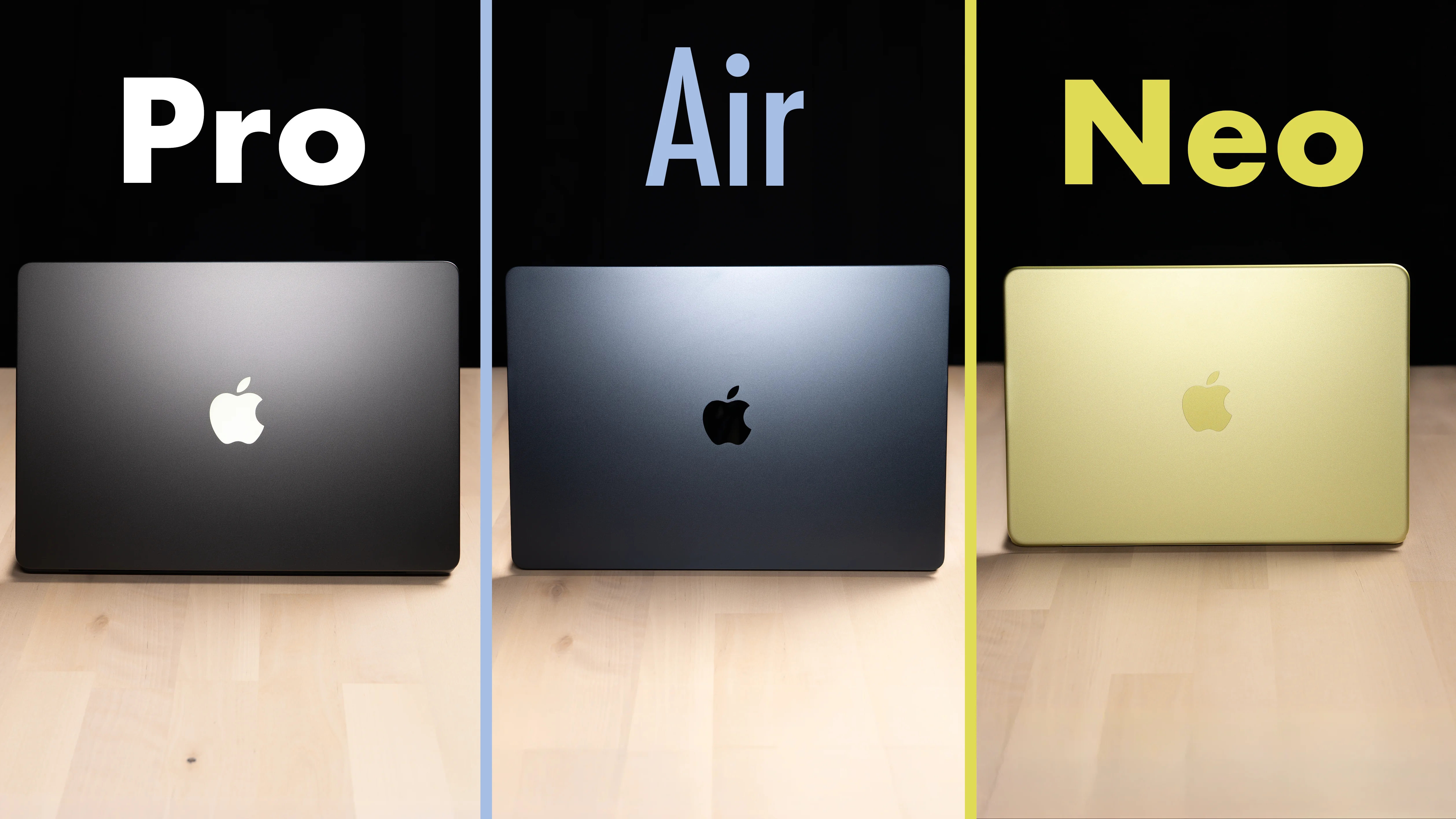
After spending well over 6 months with a MacBook Neo as well as a MacBook Air, and now that I’ve got the brand-new MacBook Pro in hand (all of which we purchased, per our ethics policy), here are my thoughts on each MacBook in this year’s lineup, who they’re for, and whether you should buy one now or wait. Here’s how the four compare at a glance.
| MacBook | Starting price | Chip | Display | Ports and extras |
|---|---|---|---|---|
| MacBook Neo | $699 ($799 with Touch ID) | A18 Pro, 8 GB RAM | 500 nits, no P3 wide color or True Tone | 1 USB-C 3 and 1 USB-C 2 (left side only), no MagSafe, 1 external display |
| MacBook Air (M5) | Check current price | M5 | 500 nits, P3 wide color, True Tone | 2 Thunderbolt 4 (left side only), MagSafe, 2 external displays, backlit keyboard |
| MacBook Pro (M6) | $1,999 | M6 | Mini-LED | Thunderbolt 4, USB-C on both sides, SD card slot, MagSafe, 2 external displays |
| MacBook Pro with PROLED XDR Display | $2,899 | M5 Pro or M5 Max, 24 GB RAM, 1 TB | 120 Hz tandem OLED, 1,000 nits sustained, touchscreen, Dynamic Island | Thunderbolt 5, USB-C on both sides, SD card slot, MagSafe, 3 to 4 external displays |
MacBook Pro with PROLED XDR Display
First up, the newest MacBook in the lineup, the MacBook Pro with PROLED XDR Display. This MacBook has the biggest upgrade Apple has made to the MacBook Pro line in years.
The display

It has an absolutely gorgeous 120 Hz tandem OLED panel with crazy good contrast, slimmer bezels, rounded corners on the top and bottom, and 1,000 nits of sustained brightness versus 500 on the Neo and the Air. It also has the best color accuracy and color representation of any MacBook.
Honestly, if you see this display and you have $3,000 that you’re willing to light on fire, well, consider that cash already burned. That is how good this display is.
Do note, like most OLEDs, it uses pulse width modulation for dimming below around brightness level 7, from what I’ve seen. So those sensitive to that tech might want to opt for the mini-LED version of the MacBook Pro, which doesn’t have as low of a hertz of PWM.
The glowing logo is back

But that’s not all. The glowing logo is back, a design feature we have not seen on MacBooks for about a decade, and one Apple had to custom engineer. With the old MacBooks, that glowing light you saw on the back was just the backlight of the display panel shining through a cutout in the aluminum. But with OLED, there actually is not a backlight, so Apple spent a ton of money completely re-engineering a new way to make the Apple logo glow on the back.
And not only glow: when the MacBook is off, it just looks like the reflective Apple logo MacBooks have had for years now. I just love it when Apple burns a ton of money to over-engineer something like this. That’s just so Apple, in a good way. This is the good Apple.
Weight, speakers, mics and camera
This MacBook Pro is also noticeably lighter than the previous MacBook Pro, and the 14-inch model only weighs 0.3 lbs more than the comparable Air and Neo. That’s how light they were able to get it.

Apple also said they upgraded the speakers. Overall, they sound good. They project an interesting stereo field that fills up more of my ears than the other two, though they also seem to have more boost in the mids and low end than the highs, so stuff doesn’t sound quite as clear. The Air I have is larger, and while it sounded different, you definitely get more in the highs. In general, larger laptops are going to sound better than the smaller 14-inch versions, just because there’s more air in the enclosure for those speakers to push and work with.
I also tested the mics and cameras on all three in my studio. Overall, the Pro and Air sounded better and their cameras were basically identical, but the Neo is noticeably a step down in both build quality and camera quality. One other difference with the Neo: there is no green dot next to the camera, so your eyes don’t know exactly where to look. You can kind of make out that the camera is there, but it’s really hidden. That’s one nice thing about the other two laptops.
Keyboard, ports and touch

The new MacBook Pro has the same great keyboard and ports MacBook Pros have been known for for a while now. It has all of the ports I would want in a mobile Mac for my work, which often involves SD cards and multiple Thunderbolt and USB-C accessories. And it’s really nice that it has USB-C on both sides of the laptop. The Air and Neo only have ports on the left side, and depending on your situation, it’s just nice to be able to plug something in from the right.
Oh, and it’s a touchscreen as well, which for niche use cases is definitely nice to have.
The Dynamic Island

This design solves basically every complaint I’ve had with the MacBook Air and Neo. Take that stupid notch on the Air, for example. Here, Apple put in a Dynamic Island, making the camera cutout part of the OS and therefore more useful. It’s where your volume now goes, your camera icon, live activities like stuff playing in the background, and where Siri now is.
Who it’s for
This new MacBook also gets the more Pro chips, the M5 Pro and M5 Max, and starts with 24 GB of RAM and 1 TB of storage on the 14-inch version I got. But it also starts at a pretty high price, $2,899, just shy of $3,000 before tax here in the US at the time of writing. So you are paying a lot to get the best MacBook.
So who is this new MacBook Pro for? I’d say it’s for professionals who have graphics-intensive tasks, but not necessarily just 4K video editing. It used to be true that tasks as intensive as video editing required a MacBook Pro because of its better speed and thermal performance, but that actually hasn’t been true for years thanks to Apple’s M-series chips. I can do all of my editing on my M5 MacBook Air just fine. In fact, my editors have been editing off an M4 Mac mini for almost two years.
It’s when you get into stuff like game design, 3D rendering engines, or trying to run as powerful of an on-device AI model as possible on your machine that the Pro and Max chips are going to be really beneficial. But again, that comes at a pretty high cost.
MacBook Pro with M6
Which is why Apple also came out with the new MacBook Pro with M6. This MacBook still has all of the same port types as the PROLED XDR model, though Thunderbolt 4, not Thunderbolt 5. It just starts with less RAM, has the last-gen mini-LED display, which is good, just not as good as OLED, and has no Dynamic Island, touchscreen, or glowing logo. But it starts at $1,999, close to $900 less than the PROLED XDR model, at least here in the US.
However, Apple loves price laddering the hell out of their product line. If you compare the two spec to spec, where the RAM, storage, chip and so on are the same, it’s only a $400 jump to the PROLED XDR version.
So if you don’t need or want all the fancy new stuff, but you still want the MacBook Pro form factor and don’t necessarily need the faster chips, the M6 is a good option. But if you’re somebody who would likely spec it up, at that point the price difference, to me at least, makes the PROLED XDR display version absolutely worth getting.
MacBook Neo

Next, the MacBook at the lowest tier, the MacBook Neo. The Neo, which I reviewed earlier this year, is a really interesting addition to Apple’s MacBook lineup, because it takes the excellent hardware MacBooks have been known for, with its aluminum unibody, keyboard, and excellent trackpad. This one is a physical trackpad, not a haptic one like the ones in the Pro and Air, though it’s still excellent. And it has more fun colors than the rest of Apple’s MacBook lineup, with the Citrus color I got probably being the most fun.
Apple took that great hardware design and paired it with surprisingly good performance for 8 GB of RAM and an A18 Pro chip from a previous iPhone.
Who it’s for
So who is a MacBook with an iPhone chip in it for? This is the MacBook to get if you don’t need your display to be reference monitor quality. You just want a laptop for things like web browsing, writing, basic non-intensive laptop things, and basic 4K video editing. It’s good if you’re starting out in something as intensive as video editing, though I wouldn’t have it as my production machine, mainly due to the RAM and the chip. I just want better performance and faster exports. But overall, it has been really great for non-intensive computer stuff.
The price, and when to wait
The unfortunate thing about the MacBook Neo is that it’s not quite the deal it was when it launched. Thanks to RAM price increases and inflation, instead of the $599 it sold for a little over 8 months ago, it now sells for $699, and $799 for the model with Touch ID, which is the one I have.
The last thing to know about the Neo is that it’s likely Apple will push its RAM up to 12 GB next year so it will support more Siri AI features. If you’re worried about the 8 GB of RAM, but you don’t want to spend the money going up to a MacBook Air, in that particular scenario, if you can wait, I would wait until the Neo gets refreshed, likely in the first half of 2027.
Should You Buy Now or Wait?
That price increase brings me to the really hard question to answer this year: should you buy a new laptop now, especially if it’s on sale, or should you wait for the newer model to come out?
My general gut feeling this year is I would not wait to buy a MacBook.
Barring some economic catastrophe, RAM prices are likely to stay elevated, if not go up even more from here, which will keep laptop prices high and potentially push them even higher. If it were me, especially if I could find the one I wanted at the price I was willing to pay, I would absolutely just buy it now. You can check current prices in the featured products section above.
MacBook Air
And speaking of the MacBook Air, why would you go for it over the Neo or the Pro? There are actually a surprising number of reasons.
Performance, size and battery
First, the M-series chip. There are certain tasks, like more intensive video editing, where the better performance headroom of the M5 chip in the current MacBook Air, plus more RAM, might be worth it. The MacBook Air also comes in a larger size, like the 15-inch version I have.
It also has better battery life than the Neo and about the same as the Pro, at least for wireless web browsing, and that better battery life is something I’ve noticed over the past 6 months between the Air and the Neo. The Air also supports fast charging, and here are the charger specs you’d need for that. The Neo is noticeably slower at charging.
Charger needed for fast charging
- MacBook NeoNO FAST CHARGE30W
- MacBook Air M570W+
- MacBook Pro 14″ M696W+
- MacBook Pro 14″ M5 ProPROLED XDR96W+
- MacBook Pro 14″ M5 MaxPROLED XDR96W+
- MacBook Pro 16″ M5 MaxPROLED XDR140W+
Display and ports
That’s not the only thing the Neo doesn’t have. It doesn’t have a wider color spectrum like the P3 wide color gamut, and it doesn’t have True Tone like the Air and Pro, where the display automatically shifts to match your ambient light color temperature.

And then there are the ports. The Air and Neo only have two USB-C ports, and you might look at them and think they’re the same ports, but that is not true. The Air’s ports are much faster. They’re both Thunderbolt 4, while the Neo only has one USB-C 3 port and another USB-C port that is USB-C 2, which is incredibly slow.
Then of course the Air and Pro both have MagSafe, Apple’s brilliant proprietary charger that magnetically pops off when somebody trips over your cord, so your laptop doesn’t go flying across the room. But an even more important thing with MagSafe, I’d argue, is that it frees up a USB-C port you don’t have to use for charging on the Pro and the Air.
Keyboard, monitors and headphone jack
The Air gets the backlit keyboard a lot of people wanted on the Neo. Then there are external monitors: the Neo only supports one, while the Air and the M6 MacBook Pro support up to two, and the higher-tier MacBook Pros support three, and up to four depending on the chip you configure.
External displays supported
- MacBook Neo1
- MacBook Air M52
- MacBook Pro 14″ M62
- MacBook Pro 14″ M5 ProPROLED XDR3
- MacBook Pro 14″ M5 MaxPROLED XDR4
- MacBook Pro 16″ M5 MaxPROLED XDR4
The last difference, and probably a more minor one, is the headphone jack. The Air and Pros support high-impedance headphones for mastering audio in something like Final Cut or Logic Pro without needing an external amp.
Who it’s for
So who is the Air for? First, I think it’s for people who might be leaning toward the Neo, but the Neo is missing something they either really need or just really want, like the better display, the backlit keyboard, the better webcam and mic, the larger size option, MagSafe, and faster ports.
But the Air is also for people where the M5 processor is going to be totally adequate performance-wise for things like 4K video editing or similar tasks, but who don’t need all of the fancy stuff or the ports that come on the Pros. You’ll save a considerable amount of money going with the Air over the Pro, and you can compare current prices for all of these above.
I would especially get an Air if you can find a great deal on one now. Yes, there is likely going to be a new version early next year, but Apple might raise the price with that one as well. And if you look at the rumors right now, there’s no major redesign of the MacBook Air form factor expected next year anyway. So my gut right now is, if you can find one on sale for a good price, just buy it now.
For more, check out my full M5 MacBook Air review, my MacBook Neo review, and the rest of our MacBook coverage.