Featured Products
If you buy something from a link, 6 Months Later may earn a commission. See our ethics policy.








Related Posts
MacBook Neo vs. MacBook Air – Which Should You Buy?

MacBook Neo Review – 6 Months Later

M5 MacBook Air Review – 6 Months Later
M5 MacBook Air review after 6 months: battery life, performance, and whether to buy it over the MacBook Neo or MacBook Pro
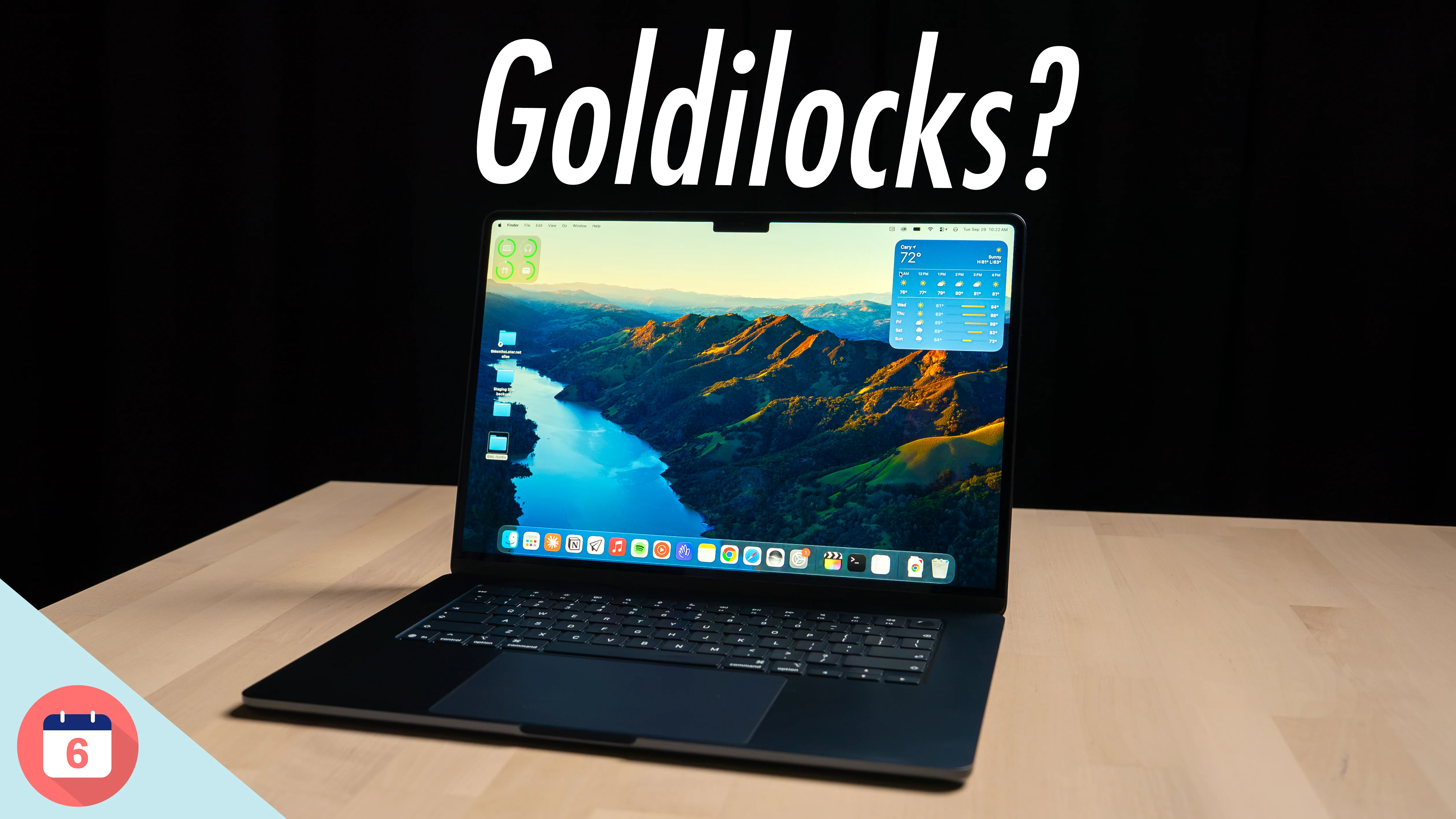
Is this still the Goldilocks MacBook, or the one most people should skip?
By Josh Teder
It’s been six months since I bought an M5 MacBook Air, and the thing I keep coming back to with this laptop is this: is it really the Goldilocks MacBook the Air has always been, the one that’s meant for the masses? Or is this now the one most people should just skip? Six months later, I think I know the answer to that question.
Build Quality and Keyboard
Let’s start with the highlights, and the first one is build quality. It’s really hard to beat Apple’s build quality here. The machined unibody aluminum enclosure not only looks sleek, but feels great when your hand rests on it.
The keyboard is pretty quiet and is one of, if not my favorite, keyboards to type on with its scissor switch keys. It makes it easy to type not only fast, but accurately, at least in my experience. And it also has a backlight, unlike the MacBook Neo.
The Display, and Why 60Hz Stings
As with a lot of Apple products, the display quality is excellent. Though, paradoxically, that brings me to my first real downside with this laptop.
The display is a high-resolution, LED-backlit IPS panel that only gets 500 nits of brightness, which is somewhat atypical for a laptop now in this price category. A lot of competing laptops from Windows manufacturers have already moved on to OLED with better brightness specs.
Apple did put in True Tone, a feature I generally love, which adjusts the panel’s white balance to match the color temperature of the ambient light in the room around you. They also put in P3 wide color, which is important for anyone who needs more accurate color representation for the work they do.
So, all of that sounds great. What’s the downside? Well, Apple decided not to include its ProMotion display technology, which increases the refresh rate of the display to 120Hz and makes animations and scrolling feel more fluid. At the time of writing, only the MacBook Pros have that technology.
My issue here isn’t that I think it’s essential to have this feature on a computer. I don’t. The only thing I scroll on my Mac is sites like 6monthslater.net, where you can see all of the latest updates on the tech we cover in our Quick Post feed, or the search results page when I need to find a specific post I did a while ago. Most of the time, my computer screens tend to be more static than my phone. And most of the time, I’m using a standard Studio Display that, like the M5 MacBook Air, is only 60Hz.
My issue is that the M5 MacBook Air starts at $1,299 and still has a 60Hz display, while last year’s iPhone 17, which currently retails for $899 here in the US, has a ProMotion display. It just feels like Apple should have added that feature to the MacBook Air for the money you’re spending.
The M5 MacBook Air starts at $1,299 and still has a 60Hz display, while last year’s iPhone 17 has ProMotion.
Weight and Two Sizes
Back to the design, another thing I like is the weight. Overall, this is a pretty light laptop. Interestingly enough, though, the 13-inch MacBook Air is actually the same weight as the MacBook Neo, coming in at 1.23 kg or 2.7 lb. So it’s not actually lighter than the Neo, as its name might suggest, though it is almost 320 grams lighter than the 14-inch MacBook Pro.
Another advantage you get with the MacBook Air line over the Neo is that it comes in two sizes: a 13-inch variant and the 15-inch one, which is the one I have. I’m not going to get into the pluses and minuses of going with one size over the other here, because I’ve already done that in my 13-inch vs. 15-inch MacBook Air comparison.
MagSafe 3
Another highlight with the MacBook Air is its MagSafe 3 port. I love MagSafe on this thing. One, it’s magnetic, so it’s easy to attach. Two, you can see whether or not the laptop is fully charged via the light on the connector. And three, it’ll detach if somebody trips over your laptop cord. It’s also color matched to the color of the laptop you choose, which is a really nice touch.

Which Charger to Get
Speaking of chargers, Apple did change what they do with chargers here. By default, the Air now ships with a 40W Dynamic Power Adapter with a 60W Max, which is able to charge it at almost peak wattage. But you’ll want to opt for the 70W USB-C charger to unlock the full 50% battery in 30 minutes fast charging claim that Apple makes.
| Charger | Upgrade cost | My take |
|---|---|---|
| 40W Dynamic Power Adapter with 60W Max | Included | Charges it at almost peak wattage. Just get this one. |
| 70W USB-C Power Adapter | $20 | Needed for Apple’s 50% in 30 minutes fast charging claim |
| 35W Dual USB-C Port charger | – | Significantly underpowered. Definitely do not buy it. |
Definitely do not buy the extremely underpowered 35W Dual USB-C Port charger. And honestly, I would just get the one that comes with it by default, then put the $20 you were going to spend upgrading to the 70W toward something like this Anker 4-port gallium nitride charging block, which you can typically find on sale for around $60.
Something like that can charge your MacBook at its peak charging rate while also charging your phone and another accessory like an Apple Watch or AirPods. It’s like the perfect thing to bring on a trip with you. Anker isn’t a sponsor, though they did send me their latest version for free, and you can check prices across multiple retailers in the Featured Products section above.
Only Two Ports
But back to the MagSafe port. Probably the most important thing about it is that it frees up a USB-C port you don’t have to use to charge the device, which is important because this MacBook only has two of them.
And again, now that the MacBook Air is getting into that $1,300 to $1,500 US territory, I really think it should come with more ports. That’s definitely another downside of going with the Air over something like the Pro, which ships with more USB-C/Thunderbolt ports and also an SD card slot, which is really important for those who use dedicated cameras.
Colors
Back to the design, there are a couple of other things I’ve appreciated, like the colors. I think the Midnight color I got looks slick as hell, though yes, it can still be a bit of a fingerprint magnet.
One potential downside with colors is that Apple is really going for an elegant, slightly desaturated, luxurious type of color here. If you want something that’s a bit more fun, really only the Neo has that, like the citrus color I got.
macOS
Another highlight with the MacBook Air is, of course, macOS. As an OS, it feels nice and clean, and not the bloated mess that Windows 11 sometimes feels like.
It Plays Well With Your Other Apple Devices
And of course, it integrates really well with your other Apple devices. AirPods, like the AirPods Max 2 I’m reviewing, will automatically switch to the Mac. You can move your mouse and keyboard between another Mac and the MacBook Air or an iPad. You can use your iPad as a secondary display. And you can pick up where you left off on your iPhone with apps like Safari, Mail, Weather, as well as Apple Pages.
Why I’ve Been Using Apple Pages
Apple Pages, by the way, is a Mac app I’ve found myself using a lot more recently. Not because it’s better or can do more than Microsoft Word or even Google Docs, but because it’s a dedicated app that comes free with your Mac, runs locally, and backs up to the cloud.
Most importantly for me, it doesn’t run in a browser, where I find I’m too tempted to click on the address bar and go search for something. And you can customize the top toolbar to make it look really clean and sleek.

iPhone Mirroring and iMessage
It integrates with your iPhone in more ways, too. You can bring your entire iPhone onto it via iPhone Mirroring. And if you’re in the US, where iMessage is pretty popular, having it on your Mac is a real game changer compared to Windows or Google’s new Googlebook.

Apps From the Web, and Vibe Coding
Plus, with macOS you can download apps directly from the web, bypassing Apple’s controlled App Store. That’s not only more convenient for downloading open-source programs like FileZilla or the USB-C checker app I love, it also increases competition and gives you different types of app models. You don’t just have to download games from the Mac App Store. You can download them from other sources like Steam, the Epic Games Store, and more.
And probably the best thing about macOS for me recently is that because it’s more open than Apple’s other software platforms, you can do things like vibe code your own programs and run them directly on macOS. I’ve done that a lot to help speed up specific workflows for my business, but also for personal use, like creating a Quick Action that automatically generates subfolders for my photo library.

Battery Life
The last major benefit of macOS is actually tied to battery life and performance. Because Apple designs its own chips, hardware, and software, they often just kill the competition when it comes to the combination of performance and battery life.
The battery life on this has been great for my use case of website work, vibe coding, and occasionally testing out editing workflows. It has not only given me all-day battery life, but noticeably better standby battery than my MacBook Neo. Apple rates both sizes for up to 15 hours of wireless web browsing, which has been in line with my experience over the past six months.
Performance
Performance has been great, too. This MacBook Air can pretty much handle any casual computing task you throw at it, whether that’s web browsing, writing, vibe coding, playing music, or doing all of those things at once.
But the thing that’s even more impressive is that I was able to take the SSDs from my Mac Studio, plug them into my M5 MacBook Air, and have it play through my timeline with no stutters or glitches. I know it’s a bit cliche for a content creator to talk about video editing performance, but the reason we all seem to do that is it’s probably the most taxing activity we do as creators on our computers, outside of maybe gaming. With the M5 MacBook Air, I’ve had no problem editing 4K video or running a ton of tracks in Logic Pro.
And the fact that it comes with 16GB of RAM to start does give you a bit more headroom than the MacBook Neo’s 8GB, which, as I discussed in my MacBook Neo review, was surprisingly adequate for casual computing. If you want this thing to last you years and years, though, having more performance headroom is something to consider, especially given AI-powered features like the more advanced Siri models that require more RAM. And with the Air, you can also configure it with more RAM, while the Neo is limited to 8GB.
Downsides: The Notch and No Cellular
So those are all of the highlights. Now let’s talk about a few other downsides before getting to my recommendations.
First is the notch. While it hasn’t really bothered me over the past six months, I still don’t understand why Apple made this design decision if they weren’t able to put Face ID into the MacBook, which, yes, I would happily take if they could figure out how to do that. The notch serves literally no functional purpose except housing the FaceTime camera. I guess that allowed them to make the bezels a bit smaller, and that’s why we have it. But why not at least put in something like a Dynamic Island? That would just be more interesting.

The other downside is connectivity. While it’s great that Apple brought Wi-Fi 7 and Bluetooth 6 to this laptop, I still wish they offered cellular connectivity like they do with their iPad line.
Should You Buy the M5 MacBook Air?
So, do I recommend the M5 MacBook Air? Yeah, it’s a fantastic laptop, but depending on your use case, it might not be the right one for you. It’s kind of in that weird middle child area. Not that middle children are weird. You know what I mean.
It’s a fantastic laptop, but it’s kind of in that weird middle child area.
You should get a MacBook Air if you want a larger laptop but don’t need all the bells and whistles you get with the MacBook Pros. While you can do some pretty intensive workloads with it, it’s still not going to perform as fast as the MacBook Pro, where graphics and performance-intensive tasks will thrive.
The other reason I think you’d get this is if you need a specific feature it has, like the P3 color display, faster Thunderbolt ports than the Neo, or M5 performance, which is notably faster than the A18 Pro chip in the Neo, especially with multi-core performance.
| MacBook Neo | M5 MacBook Air | MacBook Pro 14-inch | |
|---|---|---|---|
| Starting price | Check current price | $1,299 | Check current price |
| Chip | A18 Pro | M5 | – |
| RAM | 8GB, not configurable | 16GB, configurable | – |
| Refresh rate | – | 60Hz | 120Hz ProMotion |
| P3 wide color | No | Yes | – |
| Backlit keyboard | No | Yes | – |
| Ports | Slower than the Air’s | 2 Thunderbolt + MagSafe 3 | More ports + SD card slot |
| Sizes | One size | 13-inch and 15-inch | – |
| Weight | 1.23 kg / 2.7 lb | 1.23 kg / 2.7 lb (13-inch) | About 320 g heavier than the 13-inch Air |
But if you just want a laptop for casual computing, writing, web browsing, or watching content, given the Neo is almost half the cost of a MacBook Air, for the money I would still point you in that direction. My MacBook Neo vs. MacBook Air comparison goes deeper on that choice.
Or if you want a bit more headroom but don’t want to spend the money on a new MacBook Air, go for a refurbished one or a previous-generation model like the M4 MacBook Air. You can usually find some pretty good deals on those.
You’ll find the MacBook Air and the other laptops I mentioned in the Featured Products section above, with live Amazon prices and links to multiple retailers. And for deals on Apple products in general, just search “Apple deals” or “MacBook deals” on our shop page.
So those are my thoughts on the M5 MacBook Air after six months. For more of my Apple reviews, check out my MacBook Neo Review – 6 Months Later.