Featured Products
If you buy something from a link, 6 Months Later may earn a commission. See our ethics policy.


Related Posts
Fitbit Air vs. Apple Watch/Pixel Watch – Which Should You Buy?

Google Pixel Watch vs. Samsung Galaxy Watches – Which Should You Buy?

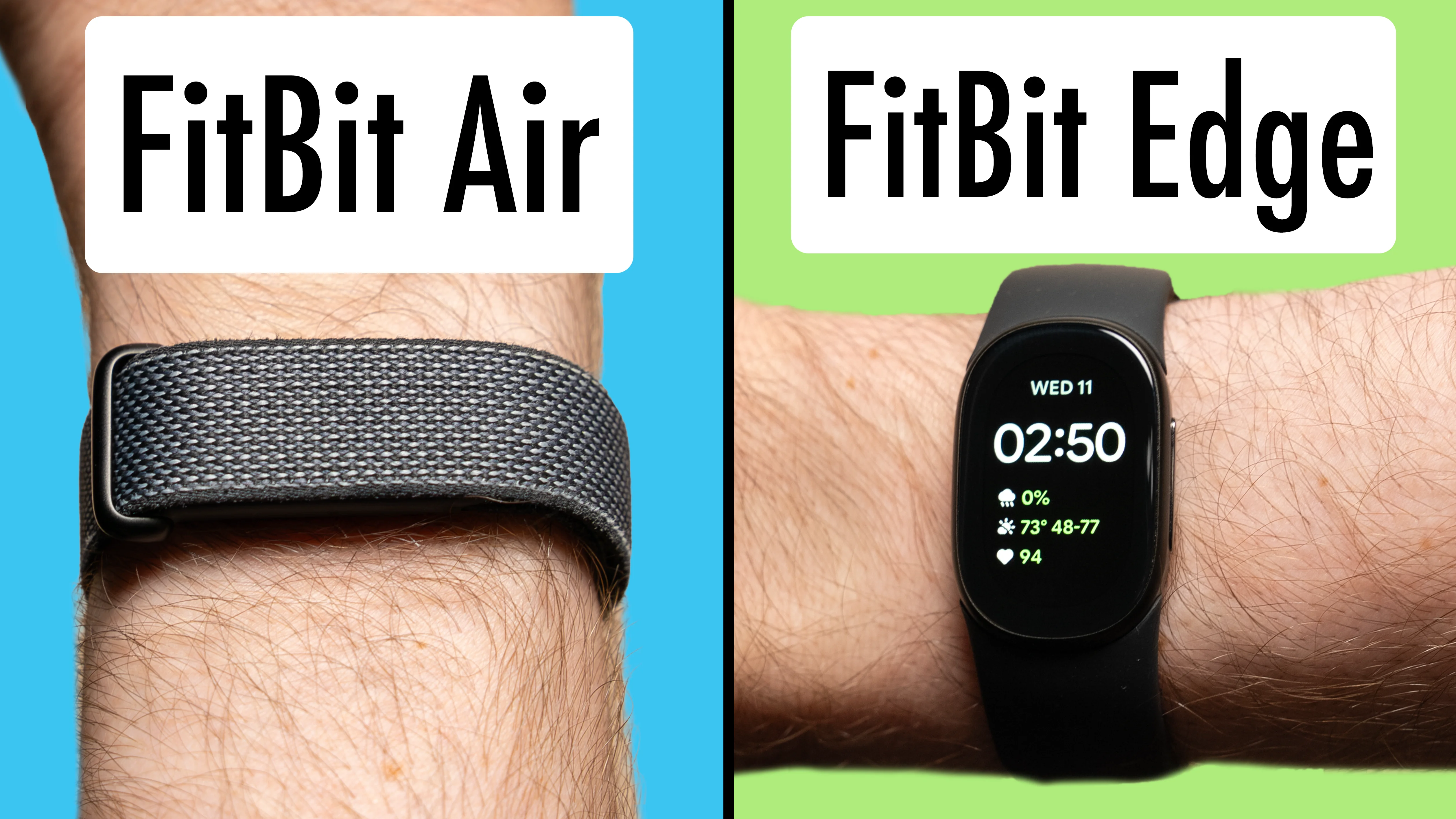
Fitbit Air vs. FitBit Edge – Which Should You Buy?
Is it worth $80 to get the one with the screen?
By Josh Teder
Google Fitbit Air vs. Fitbit Edge after almost 6 months of daily wear: what the screen adds, how the two trackers compare, and which one is worth buying
Which should you get, the Fitbit Air or the Fitbit Edge? We’ve spent almost 6 months now wearing a Fitbit Air every single day, and now that there’s a Fitbit Edge on the other wrist, this post takes you through what additional features you get on the Edge and which one we think is worth buying, whether you’re upgrading from a previous Fitbit or buying one of these devices for the first time.
| Feature | Fitbit Air | Fitbit Edge |
|---|---|---|
| Screen | No | Yes |
| Feel on the wrist | Barely noticeable | Noticeable, larger shape |
| Battery life rating | 7 days | 7 days (always-on display off) |
| Water resistance | IP68 | IP68 |
| Always-on display option | – | Yes (battery drops to just under 2 days) |
| Altimeter (floors climbed) | No | Yes |
| Workout intensity map | – | Yes |
| ECG app | – | Yes |
| Watch faces | – | Yes (up to 6 installed) |
| Text message notifications on the wrist | – | Yes (quick replies on Android) |
| Google Maps directions | – | Yes |
| Start workouts from the wrist | – | Yes |
| Vibration alarm | Yes | Yes (manage alarms from the screen) |
| Automatic workout detection | Yes | Yes |
| AFib alerts | Yes | Yes |
| Blood pressure and insulin resistance trends (Google Health Premium) | Yes | Yes |
| Works with iPhone and Android | Yes | Yes |
| Price (at the time of writing) | $99 | $179 |
What the Edge’s Screen Gets You
Weight and Feel
The biggest difference is obviously the screen, but with it come some trade-offs. The main trade-off is weight. Both of these devices are very lightweight, but the Air is the one that you’ll barely notice on your wrist. The Edge doesn’t feel heavy, but because of its larger shape, you’re always kind of aware that you’re wearing it.

A Mini Pixel Watch
That trade-off does get you a screen, which unlocks a ton of functionality. It’s like a mini Pixel Watch. You can swipe down for quick settings, swipe up to get your notifications, or swipe to the left or right to access different tiles. You can change the order of the tiles, as well as which ones appear, via the Google Health app, which both of these fitness trackers use.

Unlike a Pixel Watch, both of these trackers work with an iPhone as well as an Android phone. If you prefer to have all of your health data in Apple Health, you can now push data from Google Health into Apple Health.
The Display
The display on the Edge is surprisingly gorgeous, which you might not expect for the price. It’s pretty bright, the colors look really nice, and it doesn’t flicker when you move your arm, which always screams low-quality screen. Plus, like a Pixel Watch, you have the option to turn on the always-on display, though that will reduce your battery life from about a week to just under 2 days.

Notifications
Another cool thing about the Edge is that you can get text message notifications on it. If you have an Android device, it goes a step further by giving you quick replies to messages right from the Edge.
Starting Things From Your Wrist
The screen can display a lot of information, which the Air cannot do. But the other thing that having a screen does is let you start things from the screen. You can start a workout, take an ECG, resume media on your phone, skip forward or skip back, set an alarm or timer, or use it as a stopwatch. You can get to all of those by using the apps available on the Edge. You just click the button once when you’re on the watch face to get to that app view.

There are just so many things you can start directly from the Edge, without having to fiddle with the Google Health app on your phone.
Every time we wanted to start a weightlifting workout, we could just do it right from the Edge.
Speaking of workouts, both the Edge and Air will automatically start and guess workouts that you do based on your fitness metrics and the sensors in these devices. You also have the ability to go back and reclassify or confirm them.
What Else the Edge Adds for Fitness
If you’re more serious about fitness, the Edge has some things that the Air does not that might be important to you, like an altimeter. The Edge gives you a floors climbed metric and a workout intensity map right on the device.

Watch Faces, Maps and Alarms
Watch Faces
Another great thing with the Edge is all of the watch faces you can put on it. There are quite a few to choose from in the Google Health app. Just like on the Pixel Watch, you can customize the color scheme, plus the complications on the watch face as well. You can have up to six watch faces installed at any given time.

Google Maps Directions
The Edge also supports directions from Google Maps, which works surprisingly well with both iPhone and Android. You just have to make sure you’ve got the Google Health app running in the background on your iPhone when you start navigating in Google Maps.

Vibration Alarms
Another really useful feature that the Edge has, as well as the Air, is the vibration alarm. That’s how we’ve been waking up for the past several months now, and it’s great because it only wakes you up, not your partner. It’s also not jarring compared to a blaring alarm blasting from your phone. The Edge makes managing these alarms a bit easier because you can do it right from its screen.
What’s the Same on Both
Both are IP68 rated, and you can run them under your sink to clean them after a workout. Both have a 7-day battery life, or at least that’s their rating. We found that to be pretty accurate for both the Air and the Edge in our testing so far, though note that the rating for the Edge is with the always-on display off. Battery life with these devices in general just hasn’t been an issue, because if you put them on their chargers when you go shower, you’ll never have to worry about the battery dying on you during the day.
Both have AFib alerts and blood pressure and insulin resistance trends, though that’s only for Google Health Premium subscribers, and they’re monthly estimates, not actual sensor readings.
Both also have additional band options that Google makes for them, including a metal one, more casual bands like the new Magnet Band for the Edge, as well as other fitness ones. You can find the bands we recommend in the Featured Products section above.
Which One Should You Buy?
These devices are really designed for two different types of people.
Who the Fitbit Air Is For
The Air is really designed for people who wear watches but want something on their other wrist to track their fitness.
It also works if you want to pop the Air into a third-party band that works with your existing watch. Or maybe you have a Pixel Watch, but you don’t want to wear it to bed, and you want to be able to track your sleep with something on your wrist that’s more comfortable for doing that. Fun fact: you can actually have one Fitbit Edge, Fitbit Air, and Pixel Watch linked to your Google Health app at the same time, allowing you to hot swap them whenever you want, which in our use case so far has worked flawlessly.
Who the Fitbit Edge Is For
The Fitbit Edge is a better fit for people who’ve been wearing older Fitbits for years that are getting long in the tooth, or who just want to upgrade but don’t really like the idea of wearing a smartwatch. You still like the idea of being able to see the time and weather, start workouts, and see your fitness metrics right from your wrist, and we think the Edge is a great device for that use case. Depending on your wrist size, especially for women, some people may find it slightly too big, so that’s something you’ll want to determine when you see it in person.
Is the Edge Worth the Higher Price?
Overall, yes. The additional functionality you get with the Fitbit Edge does justify its higher starting price. At the time of writing, the Fitbit Air retails for $99, while the Fitbit Edge retails for $179.
Want more? Check out all of our Fitbit coverage.