Microsoft Surface Pro 12 Review – 6 Months Later
Is it worth getting over an iPad or Surface Laptop?
By Josh Teder
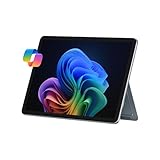
I’ve had the latest generation of the 2025 Surface Pro in the 12-inch size for the past 6 months, and I’m going to take you through the top features, downsides I’ve encountered, and my overall recommendation on whether you should get a Surface Pro or you should just get a laptop or an iPad.
Design and Build Quality
Starting with the design, I love the grippy sides of the keyboard’s palm rest. It feels very comfortable. The keyboard feels overall nice with good key travel and a satisfying sound. The aluminum back feels premium, and the kickstand feels absolutely solid. The trackpad is also very responsive. While you physically have to click down on this one, which isn’t as pleasant to use as Microsoft or Apple’s haptic trackpads, I do wish the 12-inch got the same haptic trackpad that Microsoft has put in the new Flex Keyboard, which is only available for the Surface Pro 13-inch.
And the other thing I love about it is the Windows Hello integration, which uses a camera and sensors to create an infrared depth map of your face to verify your identity, similar to Apple’s Face ID.
The Versatile Form Factor
Another thing I love about the Surface Pro is just this form factor in general. It’s just pretty awesome. You have the versatility of a full professional operating system. You can download apps from the web. You can use it as a tablet. You can fold its keyboard back behind it, use the Slim Pen to mark up and sign documents. Like, it’s a pretty versatile device.
And running full Windows is definitely another highlight. You get full browsers on a device like this, so browser plugins actually work. And you can download full desktop apps right from the web. You don’t have to go through an app store controlled by one company. Window management is great because it’s full Windows, where the snapping window management has been great for years.
“It’s just pretty awesome. You have the versatility of a full professional operating system. You can download apps from the web. You can use it as a tablet.”
And a surprising standout to me has been that Microsoft has also done just a really great job optimizing Windows for touch as well as for the Surface Slim Pen. Given how small some icons can be in Windows and apps, I was pleasantly surprised by how well Windows works as a touchscreen over the long term.
Windows Recall
The last thing I found useful and have been really impressed by is the newer Windows feature for Copilot Plus PCs called Windows Recall. This feature basically takes a snapshot of everything that appears on your screen. So, when you forget the web page you had up and the info from it, it’s easier to use this feature to search for that information because, unlike using a web history search, this is visual, which I find to be much more useful. Now, to be clear, this feature does raise some obvious privacy concerns, which is why the snapshots are only stored locally, and the feature is opt-in.
Windows Downsides
So, those are all of the software things I’ve liked, but that’s not to say there aren’t any downsides with Windows. For example, I find it kind of annoying that not all apps have a top menu, and there are still some aesthetic inconsistencies if you dig far enough into the settings menu. And I’ve noticed that sometimes apps are actually launching first on Mac before Windows.
I also absolutely hate the garbage news and interest part of the Microsoft taskbar that’s enabled by default when you load Windows. And it’s like someone with no taste created this feature. It just cheapens the feel of the OS and it doesn’t feel premium. It just makes you feel like you’re the product instead of actually using a product.
Battery Life
Another highlight has actually been battery life. It’s been pretty solid for me over the past 6 months, though my use with this device is generally intermittent, like my iPads. The thing that’s impressed me so much with its battery life isn’t its 16-hour video playback rating or its 10 to 12 hours of web use rating, but actually its standby battery.
You can have this thing in a bag for a few weeks, as I did during my move, take it out, and it still has battery left. In my experience, if it were any of my iPads, it would have totally been dead. Now, did it have a lot of battery left after 3 weeks during my move? No, but it still had around 10 to 12% left. And that’s not nothing, especially if you just need to get something quick done on it.
The only trade-off with this excellent deep sleep state is that waking the Surface Pro takes noticeably longer than waking up my iPad Pro, which is almost instantaneous.
Speakers
And the last highlight for me has been the speakers. Now, these are tablet speakers, so don’t expect miracles in audio quality. But I really like that Microsoft designed them so they’re pointing out towards the listener versus just embedding them on the sides of the tablet like Apple and others do. I actually think Microsoft’s approach here is better and the speakers also get quite a bit louder than I was expecting as well.
Features I Haven’t Used Much
Moving on now, let me take you through some things I haven’t used as much with the Surface Pro. First up is the Slim Pen for notetaking. And this is because I don’t find note-taking to be all that great of an experience on devices with glass screens like the Surface as well as iPads. And that’s because I started using e-ink writing tablets like this Remarkable Paper Pro as well as the ones from Amazon, all of which I’ve reviewed.
And in my experience, they are just so much more pleasant to write on. Though, yes, if you want a single device for your mobile computing and notetaking needs, it will absolutely work for that use case. And I do like that the Slim Pen 2 has haptic feedback as you write, which kind of tricks your brain into thinking there’s more resistance there than there actually is.
“You can have this thing in a bag for a few weeks like I did during my move, take it out, and it still has battery left.”
Oh, and one other thing I really like about the Slim Pen 2 is the shortcuts that you can customize in settings when you press its button. A single click, a double click, and a click and hold are all actions that you can do different things with.
Another thing I haven’t used on it is the camera. Though I still think it’s good to have on a device like this for document scanning. I just haven’t scanned many documents with it.
Gaming Performance
Another thing I didn’t use the Surface Pro for is gaming. And that’s for a few reasons. One, performance. While some games and apps are okay on it, it definitely lags behind other devices like the iPad Pro, which I pointed out in my comparison between the Surface Pro and the iPad Pro, which I’ll leave here.
The games I typically play, like Cities: Skylines and Manor Lords, are simulations that typically require a good amount of computing power. And a device like the Surface Pro isn’t really designed for that. Even if you can download those games onto it, given that, if you get this device, it’s not primarily for gaming, but you’re traveling, and you’re in a bind, and you want to game on it, can you? Well, depending on the game and how resource-intensive it is, yes. It generally should be doable.
There’s just one other thing that you’ll want to keep in mind, though. This is a Windows on ARM machine. What does that mean? Well, that means that this is running an ARM chip, which is different from how Intel chips are designe,d and the previous versions of the consumer Surface Pro used Intel chips. If an app was primarily designed for the x86 Intel chip architecture, it might still not run as well on this ARM-based Surface. And not all games work well on ARM. Some games, especially those with anti-cheat systems or those that just were not optimized for ARM, may have compatibility issues or just crash. So, I would definitely check compatibility before you buy this device and expect it to run a specific game smoothly.
But overall, in the 6 months I’ve been using my Surface Pro for more casual computing tasks, writing on it, browsing the web, etc., it’s totally been fine.
Issues Encountered
Now, let’s talk about some issues that I ran into. Initially, I couldn’t get Microsoft PowerToys to install correctly. For those unfamiliar, PowerToys is a Microsoft app that lets you tweak parts of Windows to work better. So, you can implement Alt plus Spacebar to bring up Search in a similar way to Spotlight Search on the Mac or remap key commands. But for whatever reason, PowerToys wouldn’t install correctly when setting up my Surface Pro from my Surface Laptop backup.
So, I completely reset the thing, tried installing it as a new PC, not from a backup, and that did fix the issue. My guess is that because PowerToys integrates pretty deeply into the Windows operating system, it’s likely that by restoring from a previous PC, I messed something up when I tried to download PowerToys and install it after setup.
Now, outside of reviewing the Surface Pro, is this a device I’d actually find myself using day-to-day? And the answer there is actually not really. Mainly because of its downsides. Plus, I find myself more drawn into the Apple ecosystem. But let’s talk downsides first.
Downsides
The biggest one is screen glare, and it’s quite bad for such a premium device. I noticed the exact same thing with my Surface Laptop, and it will make the device hard to use with a lot of bright, harsh light in your background.
Another one is that the kickstand can dig into your legs while typing on your lap after a while, especially if you’re wearing shorts.
So, those are all of the downsides.
My Recommendations
Now, for recommendations, do I recommend the Surface Pro in general? Yes. But I don’t think this is necessarily a device for everyone.
First, if you’re an Apple user, and I’m appreciative if you’re still watching at this point, but this device really isn’t for you, unless you just hate Apple’s control over app distribution and you want the freedom that you get with Windows, which I totally get. But other than that, there’s not really a lot here for you. And that’s also why I haven’t found myself picking it up over the other devices I have outside of using it to review. Because if you already have a Mac, iPhone, AirPods, etc., the iPad Pro is really going to be the better option for this type of device.
If you also want a portable form factor, but you know, you’ll probably end up using the keyboard to type on it most of the time versus using it as a tablet, I just opt for the Surface Laptop, which I find is still more comfortable and a bit better to type on, especially when it’s on your lap for long periods of time.
The Surface Pro is really for Microsoft users who are on the go, use the touchscreen functionality a lot, and need to mark up documents or have clients sign contracts. That’s who I really think this is primarily for.
12-inch vs 13-inch: Which Size Should You Get?
So, if that’s you, then the next decision you’ll want to make is whether or not to get the 12-inch or 13-inch model. And unlike with something like the iPad Pro, for example, there’s actually quite a bit more difference between the sizes of the Surface Pro.
The 13-inch can come with an OLED display, better chip configurations, and a fancier battery-powered detachable keyboard called the Flex Keyboard, and probably the biggest difference of all, the 13-inch has a removable, upgradable SSD storage, which is awesome.
If it were me, I typically opt for the larger of the two displays, unless you really need something ultra portable, just because I find I always want that extra screen real estate when you’re not plugging the device into a larger screen.
Final Thoughts
So, those have been my thoughts and experiences with a Microsoft Surface Pro. But if you have one or a previous version, let me know how you like it, what you use it for, and if you’d recommend it down in the comments.
And to see more of my long-term reviews on computers and accessories, like my MacBook Air review or Windows versus Mac video, you can click here to get to those, or click here to see more of my popular 6 Months Later reviews. And to see all of the products I recommend at any time, you can do that by visiting 6monthslater.net/shop.
For 6 Months Later, I’m Josh Tedder. Thanks for watching.