by Josh Teder
Introduction
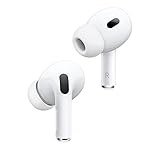
It’s been 6 months since I bought the AirPods Pro Second Gen, and they’re a product I almost forgot to review because they seem like a product I’ve always had. But are they worth it after spending 6 months with them? I’ll take you through whether I think so, their best features, and who they’re for.
Apple Ecosystem Integration
The first highlight of these buds is their Apple ecosystem integration. Put them on and they’ll pair to whatever Apple device you’re using, whether that’s a Mac, Apple TV, iPhone, or even your Apple Vision Pro if you just happen to have one of those lying around. With an Apple TV, you can actually pair up to two AirPods at once, perfect for watching TV late at night. You can also use Audio Share to share a song or other media between two sets of AirPods from a single Apple device like an iPhone.
Device Switching and Connectivity
The seamless switching between devices has worked really well for me over the past 6 months. I’ll pause something on my Mac and start playing something else on my iPhone, and the buds will rapidly connect to the iPhone and start playing media. This particular version of the AirPods with the USB-C case takes the ecosystem integration even further with a wireless lossless audio connection just for the Vision Pro. Both these buds and the Vision Pro have an H2 chip, which allows them to communicate together and render pure uncompressed sound in real time.
Audio Quality and Spatial Audio
These buds also have excellent spatial audio. It’s by far the best I’ve heard on a set of buds. Other buds like the Pixel Buds Pro with Pixel devices have this ability too, but the way Apple is implementing it, it just sounds better and more theater-like in my experience. The same goes for Dolby Atmos music with these buds. Atmos sounds better on these than any other buds I’ve experienced – the sound is just a bit more dynamic.
Sound Performance
Let’s talk about how these sound in general. Overall, these sound pretty good. Their design creates a light seal in your ear, helping to block out noise through passive and active noise cancellation, which gets you better overall audio than with the AirPods 4. If you’re curious about how these compare in general to the AirPods 4, I’ll leave a link to my comparison of these two buds in our blog post for this video at 6months.net.
Bass and Sound Signature
The AirPods Pro Two have excellent detail, a nice clear sound, and a pretty wide sound stage for a pair of buds. While there’s not as much bass pronounced in the mid to low range as you get with the AirPods 4, you do get those really deep bass notes thanks to the seal they create in your ear. Unfortunately, you can’t adjust the EQ of these buds if you want more bass, which is one of the only significant downsides I found with them.
Noise Cancellation
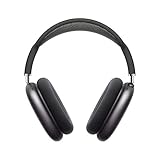
Their sound signature is pretty similar to the AirPods Max if you’re familiar with how those sound, though of course, those being over-the-ear headphones, they have an even bigger, fuller sound. A big part of what makes both products sound so good is their noise cancellation technology. The noise cancellation on the Pros really shines with lower frequency noise. They work great for flights, and they’re good for blocking out traffic and city noise, though it’s not perfect.
Real-World Performance
When you’re doing things like cooking or doing the dishes, I do notice higher-pitched noises leak in. While trying to listen to a podcast with the AirPods for a few weeks, I noticed I was having more instances of my ears ringing after wearing them, something I’ve never noticed with my Sony WF-1000XM5. My guess is because my Sony buds have better passive noise cancellation with their foam tip design that goes further into your ear canal. For activities with loud sudden sounds like clanking metal dishes and pots, they protect my ears better than the AirPods do.
Fit and Comfort
And yes, I did try out all the different ear tip sizes for the AirPods Pro 2. I did the ear seal test and everything, but I still haven’t found they block out quite as much background noise as I want. One caveat with Sony’s design though is because they go farther into your ear canal, not everybody is going to like that type of design, and some are going to find them uncomfortable compared to the AirPods Pro 2.
Long-Term Comfort
Speaking of comfort and design – and I can’t believe I’m actually saying this – but yes, comfort with the Pros is actually a highlight. I originally got the first generation of AirPods Pro when they came out back in 2019 but quickly returned them because I found after having them in my ears for 15 minutes or so, my ears hurt. Maybe it’s because I’m older and my ears have gotten slightly larger. Whatever the reason, I can now wear the Pros fine, and overall I find them pretty comfortable and have been able to wear them for hours without issue. However, as with every pair of buds that you place in your ears, your experience may vary wildly depending on your ear shape and size.
Case Design and Features
While we’re on the topic of design, let’s talk about the case – it’s great. The number one thing I love about it is it’s integrated with Find My just like an AirTag, so you can get precise directions to where it is via an iPhone or another device with a U1 chip. You can even play a sound from it, which is quite loud thanks to its integrated speaker. The case features USB-C on the bottom and can magnetically charge via Apple’s MagSafe charger for the iPhone, but it’ll also charge via the Apple Watch charger as well. It also has an integrated lanyard loop for you to attach it to a backpack or bag.
Sponsored Section – Bellroy
And if you want an excellent bag to slide these into, you should check out my favorite one from this video’s sponsor, Bellroy. I’ve been using Bellroy products for years now because of their quality design and materials. Bellroy is a design-obsessed Australian carry brand focused on making products for how we move throughout the world. They solved common problems like fat wallets and flimsy bags and are constantly pursuing better material practices. For example, this elegantly designed Classic Backpack is made using recycled polyester made from 100% recycled plastic water bottles and EOT-tanned leather.
Backpack Features
Its outer fabric has been durable water resistant and still looks great. The updated Classic Backpack can hold up to 16-inch laptops, has a padded iPad or A5 document pocket with a pen slip perfect for holding my Apple Pencil. Its top pocket is water resistant, perfect for storing a small phone, keys, or in my case, sunglasses, and I love having the front pocket to quickly store items like when I’m at the security line at an airport. You can fit a lot in this backpack, but when you put it on, it never feels too bulky and it has great lumbar support too.
Backpack Options and Offer
The Classic Backpack comes in several colors and has an entirely leather-free version, and it comes in a smaller and larger version too. Plus, it’s backed by Bellroy’s 3-year warranty. For limited time, you can get 10% off not just a Classic Backpack but any product on Bellroy’s site, and any purchase made using our link helps support 6 Months Later. So what are you waiting for? Get 10% off your order today by using that link in the description below, and thanks to Bellroy for sponsoring today’s video.
Additional Features
Turning back to the AirPods, both their case and the AirPods Pro 2 are IP54 dust, sweat, and water resistant. The transparency mode is another standout feature. I’m currently using it right now to record this video, and it’s one of the best you can get in a pair of buds. It’s so good it kind of makes you forget you’re wearing them, though it’s still not to the level that the AirPods Max are – they truly sound like you’re not even wearing headphones. But overall, the AirPods Pro have very good transparency mode.
Battery Life and Microphone Quality
Battery life is about average compared to other buds. Given the size of the Pros, you get up to 6 hours of listening time on a single charge with active noise cancellation enabled, including when listening with Atmos tracks, and the charging case provides 30 hours of total listening time. When it comes to mic quality, they do have some distortion when recording them via QuickTime on my Mac, but overall I’d still say my voice sounds pretty good, and right now I’m just recording them via my iPhone.
Physical Controls
The physical controls on these buds are another win. While the way Apple implemented their volume controls isn’t perfect – sometimes it takes me a second try for it to register the flick of my finger – and it’s not actually a button when you press down on the stems by the way for controls, it’s actually a Force sensor, and the buds will produce a sound that mimics the sound of a click. Pretty cool.
Smart Features
Another standout feature is the integration with Apple’s digital assistant. Now for me, it’s worked well and been pretty seamless, and these are about the only set of buds you can get if you have an iPhone that will let you trigger Apple’s assistant hands-free. Noise reduction is another cool feature – the AirPods Pro 2 can automatically reduce the intensity of sudden loud noises, helping protect your ears from damage. This is a feature I didn’t even realize I have used, but it turns out it’s just always on with the AirPods Pro 2, and you can see in the Apple Health app on an iPhone when it’s been turned on and how much it reduced loud noises.
Settings and Additional Features
The last thing I really like about these buds is when connected to an Apple device like an iPad or iPhone, their settings can easily be found in the Settings app main page. So those are all of the features I use regularly, but there are quite a few capabilities of the AirPods Pro 2 that I haven’t found myself using over the past 6 months.
Hearing Aid Functionality
First up is hearing aid functionality. AirPods Pro can be used as a clinical-grade hearing aid using the results of a hearing test you can take on your iPhone. Based on the data from that test, the AirPods can then make adjustments so you can hear voices and sounds around you better. Now anyone can take the hearing test – I took it, and I’m glad Apple added it because it is important to know what your hearing health is so you can adjust potential behaviors that could be damaging your hearing. Apple will also keep track of how loud your volume listening has been while using the AirPods Pro 2, and you can see that in the Health app.
Adaptive Features
Adaptive Audio is another feature I haven’t used that much. It tailors the noise cancellation to your environment, which is great for those who don’t like the feel of full-on noise cancellation where you can feel that pressure sensation build up in your ears. For me though, most of the time I just want all of my sound blocked out, so I keep them in noise cancellation mode.
Personalization Features
I also haven’t used the Personalized Volume feature much, which uses machine learning to understand your listening preferences in different environments. I just always want to be in control of what volume my buds are set to. Separate from the Pros’ hearing aid functionality is another feature that can also boost conversations, amplifying the voice of the person directly in front of you as well as lower media volume when you start to speak to someone, and it’s a feature I always want to use but then get annoyed when it turns on when I’m singing along to some music, so I end up just leaving it off.
Experimental Features
Background Sounds allow you to play calming ambient sounds to block unwanted noise around you, but like a lot of experimental Apple features, this feature is hidden away in Accessibility settings. Head gestures are a newer feature that came to the buds via a software update – you can accept a call or reply to a message by nodding your head up and down or decline a call or dismiss it by shaking your head side to side.
Downsides
While these additional features add to the AirPods Pro 2’s impressive feature set, they’re not the full story. After 6 months of use, I’ve also discovered some notable downsides. The first is the case gets scratched up easily, even if you just keep it in your pocket with your phone. It’s also slippery, making it easy to fall out of your pocket. They fell out of my pocket onto the asphalt on a recent trip, and since then I have been noticing occasional connection and sound balance issues with them, likely due to that fall.
Smart Home Integration Issues
Another annoyance when wearing them and they’re connected to a device in your home like a Mac is when you say “turn off the lights,” Apple’s assistant will always respond by asking “which room?” And this is because when you wear the AirPods Pro 2 and they’re connected to a device in your home like a Mac, the assistant will still default answering on them instead of answering on HomePods that you may have in your home that know what room they’re in. And frustratingly, you can’t fix this by adding Apple devices like Macs – even Mac desktops that don’t really go anywhere – you can’t add them to specific rooms in the Apple Home app. So anytime you wear these buds around the home and you want to control your lights, you always have to specify what room you want to control the lights in.
Repairability
The last downside is repairability and battery replacement. Now, it’s not typical for almost any earbud to have a replaceable battery, but I do think it is unfortunate when you buy a set of AirPods, they have an inherent shelf life often dictated by their batteries. At least Apple will recycle them for you, which I guess does count for something, but man, a design that allowed you to replace their batteries would be sick.
Final Verdict
So after all of that, do I recommend the AirPods Pro 2? Yes, absolutely. They are a must-have accessory for anyone with a single or especially if you have multiple Apple devices. Now, are they perfect for every situation? No. I find I gravitate towards using my Sony earbuds when I’m around the house doing dishes, cooking, cleaning, etc., because of their much better noise cancellation. However, I find myself using my AirPods Pro 2 when I’m switching back and forth between a bunch of different Apple devices.
Conclusion and Links
I’ve also used them on planes when watching content on my iPad, when working out in front of my TV with Apple Fitness+, and they’re a must-have for Apple Vision Pro as well as Apple TV owners. The AirPods Pro 2 retail for $249, but you can often find them on sale, and I’ve left a link to our blog post below where you can check their current price, plus links to multiple retailers for price comparison shopping as well as links to all the other products I mentioned in this video. And you can see all of the products I recommend at any time by going to 6months.net/shop, and if you want to see my comparison between these and the new AirPods 4, you can click here to get to that video, or you can click here to get to more reviews of Apple devices like my review of the M4 iPad Pro or the Apple Vision Pro. For 6 Months Later, I’m Josh Teder. Thanks for watching!