Transcript
by Josh Teder
As someone who’s been using the Apple TV 4K for well over 6 months, now that I’ve spent a good amount of time using the new Google TV Streamer 4K, I think I can help you out on which one you should buy.
Google TV Streamer 4K Advantages
The Google TV Streamer 4K’s first advantage is price. At $99, it’s $30 cheaper than the Apple TV 4K, and it even comes in two colors: Porcelain and Hazel, while the Apple TV just comes in one black with a silver remote. And if you want the version that comes with an Ethernet port, that’ll cost you $50 more than the Google TV Streamer 4K, which already has an Ethernet port built in.
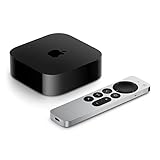
The second advantage is the remote. Google’s remote has this built-in speaker that can be used to find it when lost. You either press a button on the back of the streamer to start playing a sound on the remote, or you can just ask the Google Assistant on any of your Google devices, “Where’s my remote?” and it’ll start playing the sound for you. It also uses swappable batteries instead of a built-in rechargeable one like the Apple TV remote. If Apple had a similar feature or Find My capability with their remote like you have with AirPods and AirTags, I think the remote would actually be a bit better. Apple’s remote does have a better hardware build overall with its metal construction and more clicky buttons, though they are a bit louder. But the main differentiator, and the one that sets Apple’s apart from almost every other remote out there, is the area you can use to swipe through the interface, which I find more intuitive for things like moving the playhead versus clicking and holding a button like on the Streamer remote.
The third advantage for the TV Streamer is the Google Photos integration for screensavers, letting you display your personal photos right on your TV. Oddly enough, while you can use the Google Assistant to pull up specific photos like those from a recent trip, there’s no actual app or UI element to browse through your Google Photos library directly on the device itself, but you can do this on another device like your phone and then cast your photos directly to the TV.
Coming in at the number four advantage is the YouTube integration right into the TV interface, making it seamless to browse and watch content. Plus, it’ll often show videos you’ve started but haven’t finished, making it easy to get right back into your content.
The fifth advantage is free live TV. It’s perfect for background viewing. There are channels dedicated to shows like “Air Disasters,” one of my personal favorites, or “Ghost Hunters.” While the Apple TV has live TV options, they’re mainly through apps versus having a dedicated section like Google TV has for it in their UI.
Coming in at number six is the Google Home integration. The device acts as a Matter Hub and Thread Border Router to connect to your smart home devices, and you can bring up a convenient panel right on your TV to see and control all of your favorite smart home devices. Though as of this recording, you won’t get doorbell visitor notifications as you’re watching something, as far as I’ve been able to tell.
The seventh advantage of the Google TV Streamer is Cast support, which Android supports, as well as some apps on iPhone where you can cast music, media, and other content from your devices to your Google TV.
Apple TV 4K Advantages
First is the UI design. You get complete control over the layout with no sponsored recommendations cluttering your view. Google’s “For You” feed is unfortunately also filled with sponsored content from services like Tubi. For just $30 more, Apple’s TV interface feels more premium because it doesn’t have those integrated ads, and it just gives you more control. You can have your Apple TV home be set to either the app grid or the Apple TV app, though both setups will allow you to get to your “Up Next” queue. In the app view, you just hover over the Apple TV app to get into that. Though note: Netflix shows will not appear in your “Up Next” queue on Apple TV or in the main interface for Google TV recommendations, so you’ll need to still go into the Netflix app to get to your “Up Next” queue there, which is extremely annoying.
The second advantage for the Apple TV 4K is performance. While the difference isn’t as dramatic as it was with the older Chromecast, Apple’s superior processing power results in faster loading time for many apps.
The third advantage is AirPlay and audio capabilities. While Google TV supports spatial audio, the effect isn’t nearly as noticeable as what the AirPods Pro or AirPods Max connected to my Apple TV provide. Plus, AirPlay lets you group different kinds of speakers together, and you can output the sound from the Apple TV to all of those speakers, which is great for events like a Super Bowl party so people can still hear the game throughout your home. Now, you can do something similar with a Google TV Streamer, but Google’s implementation isn’t as intuitive as Apple’s. For one, Apple lets you do this in Control Center on the Apple TV, and you can just group speakers together on the fly. Not so with the Google TV Streamer – there’s no area for this in the Quick Settings menu, and from Google’s documentation, you have to do this in settings for the device on the Google Home app and set it to output the audio from the Google TV to predefined cast groups.
The Apple TV also lets you stream audio to up to two pairs of AirPods at one time, perfect for you and your partner when you want to watch TV late at night but you don’t want to keep anyone else in the home up. The Google TV Streamer surprisingly only lets you stream to one audio device at a time over Bluetooth, which feels like a real miss now that Bluetooth LE Audio is a thing. Though the one thing Google does better than Apple for Bluetooth devices is this great pairing popup. Apple only has something similar for AirPods; otherwise, you’ve got to go into settings and pair it like any other Bluetooth device.
The fourth advantage of the Apple TV 4K is its deep integration with the Apple ecosystem. You get the Fitness+ integration, Apple Arcade with gaming controller support, and Apple Music with karaoke mode. There’s also an Apple Home integration that’s similar to the Google Home one on Google TV, and you can use FaceTime while using your iPhone as a webcam through Continuity Camera.
The fifth advantage is this clever skip-back automatic caption feature whenever you skip back 10 seconds with an app using the Apple TV player, which at the time of recording are Apple TV+, Netflix, Hulu, and Paramount+. While frustratingly Disney+, Max, Prime Video, and YouTube all use their own (and inferior, I might add) media players, in the apps that use the better native Apple TV Player, when you skip back 10 seconds, the TV automatically turns on captions for 10 seconds so you can catch any dialogue you missed. It’s one of those small features that makes a big difference in the viewing experience. You can get this feature on the Google TV Streamer, but only when watching something from the Apple TV app.
The sixth and last advantage I’d give to the Apple TV 4K is cinematic screensavers, and before you say I’m grasping at straws putting this one in the highlight list, the reason I put this one on here is because I’ve just had so many experiences with people coming over and seeing the screensaver and either just being transfixed by it or just like, “Whoa, what is that?” Now, while the Apple TV can’t connect to Google Photos like the TV Streamer, it can display photos from your iCloud Photos library.
Additional Considerations and Downsides
Now, before I get into recommendations, there are some additional downsides for both of these devices I did want to mention. The Apple TV remote can lag a bit, though I found restarting the remote typically fixes that issue. On the Google TV Streamer, I’ve experienced some performance issues specifically with the Apple TV+ app where it flashed and glitched every 20 to 40 seconds during playback. Other apps like Disney+, Hulu, Max, Netflix – they’ve all worked fine for me, and both devices support the same picture quality standards: Dolby Vision, Dolby Atmos, and HDR10+ formats, and I haven’t noticed any significant difference between how the devices handle these formats on various apps. Though I do think it’s worth noting that depending on how old your HDMI cables are, you might need to buy a new one to be able to get the fullest picture quality that this device is capable of, which is 4K at 60Hz, and I’ll link the one I bought for both of these streamers in our blog post at 6monthslater.net, which now always has current updated pricing.
Another frustration I’ve had with the Google TV Streamer is volume controls when you’re connected via a Bluetooth audio device. There aren’t a ton of volume steps, which in my case isn’t enough when I’m listening to stuff on a device like my Sonos Ace headphones I’m reviewing – volume step three sounds a bit too soft, and step four sounds slightly too loud.
My last frustration with the TV Streamer is if you have a lot of movies in your library, browsing through them is a real pain compared to how the Apple TV handles it. It’ll show you genres, which of your movies are available in 4K HDR, and even show you your shared libraries so I can access my husband’s movie library as well, some of which are mine that I digitized using Movies Anywhere.
Final Recommendations
So which one should you buy? I personally still prefer the Apple TV 4K, mainly because I like having total control over the interface without all of the sponsored content and recommendations. I like Apple’s overall remote design better with the touch interface and the Apple TV Player better as well. Plus, I’ve never run into any performance issues with an app on the Apple TV, and while I don’t think the performance issue with the Apple TV+ app is even Google’s fault, at the same time, it’s still not something I necessarily want to have to deal with.
But the Google TV Streamer is compelling with its remote finder, Google Home integration, lower price point, and unlike with the Chromecast with Google TV, they fixed the overall performance issues and the UI is snappy. If you’re primarily in the Android and Google ecosystem, the TV Streamer is probably going to be the better choice for you. But for everyone else, since Google actually raised the price of this new device to $99 while Apple decreased the price of the Apple TV 4K to $129, I actually think the smaller price difference makes the Apple TV 4K more compelling than ever, especially if you’re in the Apple ecosystem.
I’d recommend spending the extra $30 for the Apple TV 4K, and to check the current price of both of these devices as well as the others I’ve mentioned, you can do that in our blog post at 6monthslater.net.
Closing
And to see my full review of the Apple TV 4K, you can click here to get to that, and make sure you subscribe to the channel to see my upcoming review of the Google TV Streamer. And then for more reviews on Google products like the Pixel Tablet, new Pixel Fold, things like that, you can click here to get to all of those.
If you like this video and found it helpful, make sure you hit that thumbs-up button below, and if you have either one of these devices or have used them, let me know what you think of them. Would you buy them again? Let me know down in the comments. For 6 Months Later, I’m Josh Teder. Thanks for watching!
Featured Products
If you buy something from a link, 6 Months Later may earn a commission. See our ethics policy.