Nothing Phone (3) Review – 6 Months Later
Does it really compete against the other flagships?
By Josh Teder
Nothing Phone (3) Review – 6 Months Later
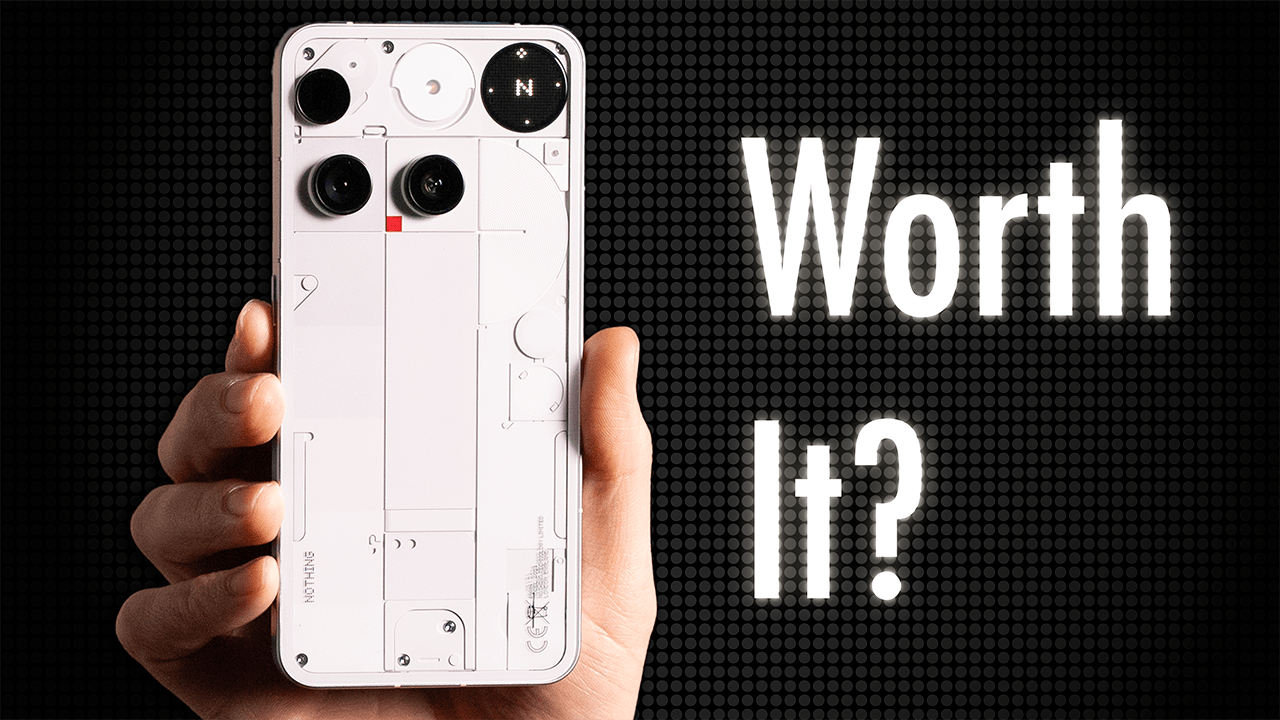
It’s been 6 months since I bought the Nothing Phone (3), and boy, has it been a head-turner, and perhaps not in a good way. But does Nothing’s maybe ugliest phone to date actually hold up to other Android flagships, or is this just a gimmick-filled phone full of novelty but not much else? After 6 months with this thing, I think I know the answer.
Nothing OS and Software Experience
The first highlight of this phone is Nothing OS. Like the Pixel version of Android, this is very clean software, but even more minimalist. I absolutely love the stark black and white look. It makes your phone’s apps look less enticing to jump into, which to be fair is a thing you can do with icons on many Android phones now with icon theming, but not necessarily in the app drawer like you can on Nothing OS. Also, it’s not really an app drawer, but more of an app library that you pull up with apps automatically categorized for you, and you can just easily search for an app.
Speaking of which, Nothing has done quite a bit of work to give search capabilities an upgrade. You can not only search for apps, but also search across the phone’s OS for things like widgets or describe a photo you’re looking for, and it’ll find it. Or if you just have a general question about something, well, it can now answer those too with Essential Search, which you trigger by clicking the yellow button to the right of the search bar, which uses an LLM-powered search for knowledge queries. This has worked quite well in my experience. Though, for knowledge-type queries, you’re probably better off using the regular Gemini, which is the phone’s assistant.
Essential Space and AI Features
Essential Search is part of what Nothing calls its intelligence toolkit, which are basically all AI-powered features. One of the new major features within this toolkit is the Essential Space, which is its own app on the phone accessible by clicking the Essential button, a dedicated button below the power key on the right side of the phone.
So, what exactly is the Essential Space? This is where you can store all of your screenshots, notes you attach to screenshots, voice reminders, and recordings. You can long press the Essential key to tell your phone to remind you to do something, and it’ll keep the recording in the Essential Space, but also use on-device AI to contextualize the content of that recording and figure out if it needs to create a reminder based on what you said. You can even have the Essential Space hook up to your Google Calendar so these reminders can appear there.
But why wouldn’t you just use Gemini to create reminders or calendar events? Well, great question. I think you would use the Essential Space really when you want to have that recording saved on device, which Gemini just doesn’t do. Though, because it doesn’t sync to the cloud, that means I can’t access it on other devices. So, the utility of this feature for me over the past 6 months has been somewhat limited.
Display and Build Quality
Moving on to the display, that’s another highlight. It has excellent quality and off-axis color. It’s sharp and vibrant. The pulse-width modulation or PWM, which flickers the screen at a high frequency to make it appear dimmer, was lowered to 960 Hz at lower brightness levels on the Phone (3), which is still well above its competition here in the US. So, if you’re sensitive to this type of tech, it will still be better than the phones from Google, Apple, and Samsung.
Build quality is actually another standout. The phone feels great in your hand. The brushed aluminum helps give the phone a solid, more premium feel. The speakers are actually pretty decent. I’d say they’re on par with the Pixel 10 Pro XL. And related to the display, I love that Nothing by default includes a screen protector that comes pre-installed on the phone. I wish more companies did this.
Battery Life
Another highlight I’d say is the battery life. The 5,150 mAh silicon carbon battery has easily lasted me all day with my use. Now, on a typical day, I’m seeing battery dip down into the low 70% range to upper 60% range, which for me is pretty great. And that’s on par with what I’ve experienced with the iPhone 17 Pro Max as well as the S25 Ultra.
And my typical days are normally 1 to 2 hours of screen time and 1 to 2 hours of background activity. And then with heavier use, I’ve seen it dip down into the 50% range, which is also quite good for my use.
Community Features
Another big differentiator for Nothing phones are the community-inspired features like the QR codes you can use to get custom sound profiles for the Nothing Headphone 1. Using that feature was an absolute must to get these sounding good. And if you want to see my review of these, by the way, you can click here to get to that.
For the Phone (3), the three biggest community features are the Essential apps, which are basically community-designed widgets that you can add to your home screen, but they’re more interactive than your average widget. And then there are the Glyph toys that you can download for the Glyph interface. And then lastly, presets for the camera.
Now, we’re in the early days of the Essential apps feature. It’s not currently even in beta. It’s in an alpha stage, but I actually do see a lot of promise with this feature, or at least a lot of potential, mainly thanks to AI. And specifically, because AI has gotten so good with coding and allowing people to vibe code things, it’s very likely that if there’s a widget that you want on your Nothing phone that just doesn’t exist, you’ll likely be able to just vibe code it into existence.
Camera Presets
Moving on to presets. Some of these come with the phone by default, but you can download more of them. Frustratingly, there’s no link to where you can find more presets in the camera app. You kind of have to know these are found on Nothing’s Playground website, which should really be its own app on the phone.
Neither the Glyph toys nor the camera presets have been features I’ve personally found all that useful because the presets are destructive, meaning once you take the photo, you can’t switch to a different preset later. I don’t end up using them. While the Phone (3) can shoot in the RAW format, presets do not work in that mode.
The Glyph Interface
Now, for the Glyph interface, this takes me into the parts of the phone that I haven’t really used all that much. Look, I understand what Nothing was trying to do with the Glyph interface, but man, even after 6 months, I just haven’t jived with it like I jived with the Glyph lights on the Phone 2.
And some of this is just from an aesthetics standpoint. The Glyph lights gave that phone a really cool futuristic vibe while also showing some slightly useful information like the battery level when the phone was face down charging and you wiggled it.
“Even after 6 months, I just haven’t jived with the Glyph interface like I jived with the Glyph lights on the Phone 2.”
The Glyph interface is really just trying to be like the Glyph lights, but a bit more useful. Is it? Yes, it can display more information like the time, be a compass, a level, a mirror for selfies with the back camera, which is actually pretty cool, but there’s also quite a bit of novelty with it, like the spin the bottle game or rock paper scissors, or seeing the moon phases where the sun is, etc. It’s much easier to kind of use them once and forget about them versus I found myself constantly looking at and marveling at the design of the Phone 2 throughout my time with it.
Essential Notifications
The other thing I really tried to use the Glyph interface for was displaying different icons for different notifications with a feature called Essential notifications. With this feature, you can have the Glyph interface show a specific icon for a specific notification. So, when I get a message from my husband via Messages or Messenger, it’ll display a heart icon. Or when my friends message me on Snap, I have it show the Snap logo. And you can upload your own photos and icons to create an icon as well.
Now, I generally find this feature to be an upgrade over the Essential notification on the Phone 2. I actually think this may be my favorite use case for the Glyph interface, but one I also find I seldom use because I just often have my phone on Do Not Disturb anyway.
AI Wallpapers
The AI wallpaper feature is another one that I didn’t use. I don’t think it gives you enough ability to create the exact wallpaper you might be looking for. And then there’s the “AI created this piece of art” thing, which I don’t know, I’m pretty lukewarm on to be honest.
Downsides
Now, let’s talk about some downsides I’ve encountered. The first is the polarizing back design. It’s not technically asymmetrical if you look at it in a grid pattern, but the camera lenses do not line up symmetrically, which will just drive some people nuts. And let me know in the comments what you think of the design, especially compared to the Nothing Phone 2.
Another downside is the camera system just isn’t as good as Google’s, Apple’s, or even Samsung’s. So, if you want the best camera system in an Android phone, this is not that phone. It’s certainly decent, though, to say the least. I do appreciate that this Nothing flagship has a triple lens camera system, and the image quality is pretty good.
Now, is the camera system enough of a dealbreaker to not recommend this phone over other Android flagships? No, not necessarily. It really will depend on how much you use your phone’s camera system. And if you have to have the best camera system in a phone, for me, out of all the phones I’ve tested this year, that has continued to be the Pixel 10 Pro’s camera system in terms of Android phones at least. But if you’re someone like me who uses a dedicated camera for trips or events with friends and family, the Nothing Phone (3) will be fine for you.
Performance Issues
Moving on, another downside I ran into early on with this phone was lag, specifically with some apps opening and the refresh rate performance in dynamic mode. Switching it to high did fix that, though.
Another potential downside for some is performance, and for me, it’s been totally fine for everyday tasks, but it is definitely a step down from the chipset that you’ll see in the S25 Ultra and presumably the S26 Ultra, depending on the benchmark. It’s very much in line with Google’s Tensor G5 performance, actually beating Google’s chip in multi-core performance and in every graphics benchmark from 3DMark that I threw at it.
Haptic typing is another minor annoyance when it does spell correction and as you type, it feels like it almost skips a haptic in a way that I don’t notice on my Pixel’s Gboard.
Minor Issues
Another slight downside is oddly you can’t add a shortcut to whatever app you want on the lock screen. Also, the widgets you can add to it are more limited than you’ll find on competing phones, but they do all align with Nothing’s aesthetic at least.
The last downside with this phone is that it’s heavier than the Phone 2. Ideally, in my opinion, phones should be getting lighter, not heavier, over time. Now, this is 218 g versus 201 g on the Phone 2, which, yes, is a noticeable difference. Though thankfully, this is still not as heavy as the Pixel 10 Pro XL or the iPhone 17 Pro Max.
Final Verdict
So, taking in all of the highlights, lowlights, and the issues that I’ve had with the Nothing Phone (3), can I recommend it? Overall, yes. I haven’t had any serious issues with this device in my 6 months of using it. Its battery has easily lasted me all day. It has a great software aesthetic, screen, decent camera system, and quite a few unique features that make this phone feel different enough from other Android phones.
“If you really have an itch to get a phone that feels entirely different from your previous phone, I do think that there is enough here that would satisfy that craving.”
If you really have an itch to get a phone that feels entirely different from your previous phone, I do think that there is enough here that would satisfy that craving.
The more difficult question with the Nothing Phone (3) is why exactly you would get this over the competition from Samsung and Google. Samsung definitely offers better raw performance. Both have better camera systems and both offer seven years of promised Android OS and security updates while Nothing only offers five for the Phone (3).
Though the Phone (3) is a good bit less expensive than a lot of competing flagships. And you can check out the purchase links here in this video as well as in the description which leads you to our blog post where you can check prices for multiple retailers and check out all the products we recommend at 6monthslater.net/shop.
Other Nothing Options
Now, if you’re sold on going for a Nothing device, should you buy this one or one of their less expensive phones that come with a lot of the same features but at an even better price? I do think that some might find the aesthetics of those phones a bit better than this one just because this has been quite polarizing. But if you were waiting for a better-looking phone, I do have some bad news. Nothing has confirmed that the Phone 4 will not launch in 2026. So you’ll have to wait until presumably July 2027. Though Nothing is expected to launch the new versions of their A-line in March of 2026.