Featured Products
If you buy something from a link, 6 Months Later may earn a commission. See our ethics policy.


Learn More
Related Videos
Meta Ray-Bans Review – 6 Months Later
6 Months Later Reviews Playlist:
Meta Ray-Ban vs. Meta Oakley Smart Glasses – Which Should You Buy?
Which line of Meta’s smart glasses should you get?
By Josh Teder
I’ve spent well over the past 6 months wearing the Meta Ray-Ban bands. And if you’ve been looking at the Meta Ray-Ban bands, but also saw the Meta Oakleys and were wondering, should you opt for those instead? I’ll take you through the differences, but more importantly, what remains the same.
Camera Differences
First, let’s talk about the main differences between these two pairs of smart glasses. First up is their cameras. While both have 12 megapixel ultrawide cameras, the Ray-Ban bands shoot HD photos at 3024×4032 pixels and video at 1440 by 1920 pixels at 30 frames per second. Now, the Oakleys have a 100° field of view and can shoot video at either 1440 by 1920 pixels or 2203×2938 pixels at 30 frames per second, which is their 3K mode. But it has to manually be enabled in the Meta AI app. And the resolution will fluctuate based on movement and stabilization, which makes me think they’re just eking out better performance with the same camera hardware as in the Meta Ray-Bans with maybe a slightly upgraded chipset. And images for the Oakleys, like the Ray-Ban bands, they’re still at 3024×4032 pixels. Both still have vertical video formats, so they’re great for sharing on Instagram and for phone first experiences, but it’s a format that won’t actually be ideal to view on something like Meta’s headsets or a future pair of smart glasses that have displays because your eyes look like this, not like this.
Case Design and Battery Life
The next major difference is the case design and weight. The Ray-Ban band case feels way less bulky and heavy at 134 g. What’s crazy is the Oakley case technically weighs the same according to Meta’s spec sheet. But I think the Meta spec sheet might actually be wrong here. The Oakley case weighs 214 g while the Ray-Ban band case I have weighed 134 g. So, I’m not crazy. It is actually much heavier and more bulky feeling, which is likely because it includes a larger battery that nets it 48 hours of charge versus the 36 in the Ray-Ban band case. And yes, the battery life is also somewhat different between the frames themselves. The Ray-Ban bands are rated for up to 4 hours on a single charge with up to 36 hours with the fully charged case. The Oakleys get up to 8 hours on a single charge and up to 48 hours with the fully charged case. And it’s unclear whether or not we’re getting updated Ray-Ban bands that will match the small spec upgrades we see in the Oakleys.
Frame Styles and Visual Experience
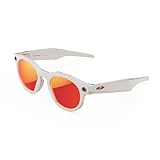
The Meta Ray-Ban bands were launched in late 2023 and are still the current version out on the market. Ray-Ban bands, as of this recording, also have more frame shapes. Right now, there’s only one Oakley style, the HSTN, which does come with several different frames and lens options, just like the Ray-Ban bands. The version I have are the polarized gradient graphite color. And for the Oakleys, I have the limited edition HSTN. When you put these on, it’s like somebody turned on the vivid mode of a point-and-shoot camera. Everything just looks very saturated. The sky almost looks like it’s got a purple tint to it and greens are incredibly vibrant. It’s almost a bit jarring, especially when you’re trying to drive a vehicle with these on. Another thing I noticed when I first got my Oakleys is that the tips are not as thick towards the back here as my Ray-Ban band glasses. Uh, but when I put them on, they do press a bit more into my head than the Ray-Ban bands do. Though this of course could just be because they’re new and I haven’t worn them as much, but that’ll be something I continue to follow as I continue to wear them.
Technical Differences
There are some slight technical differences that are worth noting. The sounds for things like volume up and down are a bit different on the Oakleys than they are for the Ray-Ban bands. Have a listen. [Music]
The Oakleys also have Bluetooth 5.3 versus 5.2 as stated on Meta’s site. However, this difference is so minuscule, it’s not going to result in any real Bluetooth performance gains in my experience.
What’s the Same Between Both Glasses
So, what’s still the same between both of these pairs? It’s basically the same overall experience that I talked about in my Meta Ray-Ban bands review, which I’ll link here if you haven’t seen that yet. So, you can take photos and videos, play music and podcasts, and chat with Meta’s AI assistant, as well as other things like phone calls. Both glasses are IPX4 splash and water resistant, so you can wear them out in the rain, just not into the pool or the ocean. Audio spec-wise, they’re rated exactly the same. For live streaming, that ability is exactly the same, 30 minutes max, and you must be in temperatures of at least 5 degrees C for the Ray-Ban bands. But that’s just for live streaming. I don’t believe either of these glasses has that same minimum operating temperature for normal use. So, you can still get photos and videos out on the slopes without needing to worry. And storage capacity is identical between them at 32 gigs.
Final Verdict
So, if you were looking at getting the Meta Ray-Ban band glasses, but you were curious about the Oakleys, is there enough to justify going with these over the regular Ray-Ban bands? No, not really. Unless you just really like the look of the Oakley line of glasses better. I’m definitely not that person. Even if the prices were equivalent, I would have opted for the Meta Ray-Ban bands because I like their design better. Although yes, I would miss the additional battery life that you get with the Oakleys. And you can check out the current prices for each above in the Featured Products section. And if you want to see my full six months later experience with the Ray-Ban bands, you can click here for that review or click here for reviews on some other emerging tech products like the Vision Pro, Remarkable Paper Pro, and more. And you can shop and check prices on all of the tech we recommend at any time by visiting 6monthslater.net/shop
For 6 Months Later, I’m Josh Teder. Thanks for reading!