Featured Products
If you buy something from a link, 6 Months Later may earn a commission. See our ethics policy.




Learn More
More info about Apps Only Mode
Google starts rolling ads out in ‘Apps only mode’ – flatpanelshd
Related Videos
Google TV Streamer vs. Apple TV 4K:
Apple TV 4K Review:
Google TV Streamer (4K) Review – 6 Months Later
Has Google finally made an Apple TV killer?
By Josh Teder
Overview and Performance
The Google TV Streamer 4K is Google’s latest attempt to create a truly great TV streaming device. But after spending 6 months with one, is this something that I can recommend most people get over sticking with their smart TV or going with an Apple TV 4K? Google has finally equipped a streaming device with a sufficient processor along with 4 gigs of RAM and 32 gigs of storage. All of that adds up to an experience that feels speedy enough to actually recommend, which was not the case with their past attempts, which often would slow down over the long term. This one hasn’t seemed to do that 6 months later and still feels pretty snappy.
Price and Value Proposition
Price is another highlight. $99 is still a relatively attainable price point for everything Google built into the device and still around $30 cheaper than an Apple TV 4K. And I’ll leave purchase links in the description and pinned comment if you want to see if any sales are currently going on with this device, as well as the other devices covered in this video. And it’s easy to learn more about each product and see where else we’ve covered them by clicking the eye icon at the top right corner of the product card.
Why Choose a Dedicated Streamer?
Back to the price, though, I do think that’ll still give some people pause. Most TVs nowadays are smart TVs with built-in apps and their own operating systems. Why spend $99 on essentially the same experience with a different remote? Well, a few reasons. One is better performance. Sometimes smart TVs don’t offer the best performance with their apps or navigation because their chips are primarily designed for picture quality, not running an operating system. Though modern smart TVs do a better job of this.
Software and User Experience
With the TV Streamer though, you do get Google TV, Google’s own software, which can personalize entertainment for everyone in your household with their own user profile. You can also easily connect your speakers, Pixel Buds, or other devices to it if you don’t have a sound system or soundbar already. And specifically with the Pixel Buds, you can get spatial audio through them from the TV Streamer. Though, I have to say I haven’t been as impressed with that experience compared to using AirPods and the Apple TV 4K, which just sound better.
Remote Design and Features
Plus, you just get a nicer design in some aspects, like with the remote. Think of all of the times that you’ve lost your remote. Well, Google actually did something about that with their brilliant remote finding feature. To find it, press the button at the back of the unit or ask a Google Assistant from a Google device, “Where’s my remote?” The remote has a built-in speaker, so it’s really easy to find. The remote’s design itself is also pretty nice. It’s a bit thicker and larger in size, and I don’t find it wedges in between couch cushions as easily.
Casting and Android Integration
Cast support is a great feature for those with Android phones who want to cast music, media, and other content to the device. If you have an iPhone, not all of the content on your phone can be cast. The apps themselves need to support casting, which can be more limited. One cool thing is if you have an Android device like the S25 Ultra I’m reviewing, when I start playing something on the TV Streamer, a small now playing status button appears at the top left of my S25 Ultra, allowing me to control playback directly from the now playing view or even use it like a TV Streamer’s remote as well. And this works on other Android devices like Pixel phones and tablets.
Another nice touch is the swappable batteries. The remote is also just nicely designed. Google brought the same HDMI CEC experience to the Streamer from their previous Chromecast devices. So, when I hit the power button, the Streamer, TV, and my receiver all turn on at once. Google also built an infrared blaster into the front of the remote and that allows it to learn to turn on various devices, especially if you have a device in your TV setup that doesn’t work well with the HDMI CEC standard.
YouTube is integrated into the TV interface, so the latest videos from your favorite channels are intermixed with shows, movies, and other content from other streamers. It makes it easy to get back to the stuff I was watching but paused or ran out of time for. Another thing I think a lot of people will dig with the Google TV is the free TV feature, which is made up of channels focused on specific topics or shows that you can flip through. Like here in the US, air disasters, one of my personal favorite genres. Though the channels that appear will vary depending on your location. This feature makes it feel like there’s always something to watch, which is especially nice if you don’t want to pay for every streaming service on the planet.
Smart Home Integration
The Google TV Streamer 4K also functions as a Google Home Hub with a Matter hub and Thread border router capability built right into it. This means it can serve as a central hub for all of your smart home devices. And Google makes it easy to directly control everything from your lights to your thermostat directly through the TV interface.
Sponsored Content
Speaking of smart home devices, while the Google TV Streamer is great for entertainment, if you’re looking for a smart lock that won’t break the bank, you should check out this video sponsor, Deslock, and their brand new D110 Plus smart lock. One of the coolest things about it is their Lock View display, which shows you all of the settings and statuses you need right on the lock itself. The D110 Plus also has built-in Wi-Fi, so you get real-time notifications on your phone without needing any hub or gateway. I can unlock it remotely and manage up to 50 different fingerprints using its fingerprint sensor. Deslock claims it can unlock in under 0.3 seconds with 99% accuracy. It has six different ways to unlock: fingerprint, PIN code, the app, voice control through Alexa or the Google Assistant, traditional keys, and even key fobs. It’s also built tough with an IP54 rating. So, it’s dustproof, waterproof, and has a corrosion-resistant PCB with anti-condensation protection. Deslock claims it’ll run up to 6 months on just four AA batteries. And if they ever die, there’s USB-C emergency charging built right in. For under $100, the Deslock D110 Plus offers features that typically cost twice as much. And if you want to pick one up for yourself, you can use our link in the description to get a Deslock D110 Plus. And thanks again to Deslock for sponsoring today’s video.
Features I Haven’t Used Much First up is the Google Photos integrated screensaver. I don’t usually keep my TV on in standby mode so long, but if I did, this feature is great. It turns your TV into a giant Nest Hub or Pixel Tablet, both of which I’ve reviewed. Another thing I haven’t used because I forget it’s there half the time and haven’t quite gotten that muscle memory yet, but do think is a welcome change is the TV Streamer’s remote has this new favorite button which replaced the input button on the Chromecast with Google TV. With this button, you can have it mapped to bring up the Google Home view where you can see all of your favorite devices and control them from the side panel that appears or your favorite app or have it act as a source input switcher.
The Downsides After 6 Months
Now, let’s talk about the downsides I’ve encountered with the Google TV Streamer 4K over the past 6 months. Ads are by far the largest downside of going with a Google TV Streamer. You paid $100 on a dedicated device for better TV watching and there’s still an ad for a movie you have no interest in as soon as you turn on the device. That kind of sucks. Now, as some have pointed out in YouTube comments on my previous videos, yes, there is an apps-only mode that will display a view similar to the default Apple TV grid, but this mode will get rid of the personalization. Plus, it doesn’t include any assistant or search, no watchlist or library. And depending on your location, you will still see ads in this mode.
Another issue I’ve run into is with volume steps when using Bluetooth devices. There just simply aren’t enough of them. So, I find the volume to either be a bit too loud or too soft, but never just right. This is an issue I’ve had with Android devices from time to time. So, I’m wondering if this is a carryover of that into the Google TV software, but it’s definitely something I don’t have an issue with on the Apple TV 4K.
Speaking of Apple, another downside I’ve encountered on the TV Streamer is actually with the Apple TV+ app. Its performance has occasionally had some issues where I’ve seen occasional flashes while watching content. I’ve noticed that some other TV platforms have issues with this app as well. So, it’s probably more of an issue with the app rather than with the TV Streamer itself, but something to still be aware of. It also takes forever to scroll down to the watchlist on Google TV.
Another downside is the Google TV Streamer 4K doesn’t support multiple Bluetooth devices at the same time. Another frustrating thing is there’s no multitasking view to quickly force quit an app that’s not responding. To do this, you have to go into settings, then apps, and then find the app and force quit it.
The last slight downside involved setup, which was overall straightforward, utilizing the Google Home app to do it. Though, mine did get stuck on a blue screen for a few minutes after restarting. But that was kind of weird. I actually had to hit the power button to bring the TV Streamer’s picture back up on the TV.
Final Recommendation
So, after spending 6 months with one, do I recommend getting a Google TV Streamer 4K? Maybe. If you already have a TV with Google TV built-in, like my Sony OLED, I don’t think you need to spend $100 to get this. You’ll have the same software plus a TV you can already cast to from Android and other devices.
Now, if you have a Roku TV, Fire TV, or TV with another OS that’s been working fine, should you go with this? I do think Google’s software here is very good. The performance has actually been great overall, and the personalized feeds and integration with Google’s ecosystem are great. Plus, I love having an Ethernet connection and great picture quality with Dolby Vision and HDR10+ and great sound with Dolby Atmos support. Though, note you might need a new HDMI cable to get picture quality in those standards. I’ll leave a link to the ones I use in our products link found in the description and pinned comment.
Google TV Streamer vs Apple TV 4K
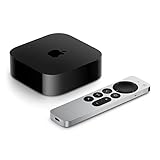
Now, did Google build something that can directly compete with the Apple TV 4K? 6 months later, I still don’t think so. They’re close. It has some things I wish the Apple TV 4K had, but Google failed to ultimately ship a device that feels as premium and as solid as an Apple TV 4K. Technically, Apple does push its own content in the Apple TV app, but it doesn’t feel as gross as seeing a huge advertisement banner for a movie or TV show right when you turn on the TV Streamer. Apple’s industrial-designed remote also just feels nicer to use overall, and I’ve had no performance issues with any app on the Apple TV 4K. And maybe one of the most important features Google missed out on, audio sharing. So, you and someone else can stream the same audio from the Apple TV 4K to two sets of AirPods. And Apple’s spatial audio still just sounds way better than Google’s in my experience.
Who Should Buy This? If you’re in the Google ecosystem and don’t already have a TV streaming device you’re happy with, or want one that’s better integrated with Google services like Google Home, or if you have the previous Chromecast with Google TV and want better performance and feature upgrades, I think you’d still be happy with this device. But if you don’t care that much about which ecosystem you’re in and you want a nicer TV watching experience, this device doesn’t change my general recommendation to just get an Apple TV 4K, regardless of whether or not you have an iPhone. It’s $30 more than the TV Streamer, at least here in the US. But for no ads everywhere and better performance and features overall, that still remains my default recommendation for a TV streamer.