by Josh Teder
Introduction
The Pixel 9 Pro Fold is Google’s second-gen foldable, which retails for $1,799 in the US. This phone had a lot of hype when it first launched. But was that hype justified? Is the crease an issue? And six months later, can you really justify spending that much on this phone?
The Inner Display Experience
The number one highlight with the Pro Fold is its giant 8-inch diagonal inner display. It allows you to accomplish more tasks on a phone, like multitasking in split view where you put two apps side by side. Unlike multitasking on a regular slab phone, the apps are full size. This makes multitasking more useful because you can see everything for each app and enables all sorts of new abilities, like being able to drag a photo or file from one app to another.
Another thing I’ve really liked about the inner screen are all of the software optimizations that Google has created, which just make it a joy to use. Like the keyboard—you get multiple options for its layout. If you want to hold the Fold unfolded one-handed, no problem. There’s a mode for that. Getting apps into split view is another great example. I didn’t even have to look up how to do it. You just drag an app from the dock over to the side. It’s very straightforward.
Another benefit of the larger screen is you can see the browser tabs you have open in Chrome. I’ve really liked being able to quickly switch back and forth between tabs like you can on a tablet or computer. This larger screen is, of course, not just great for getting some work done on your phone, but it’s also great for watching content like YouTube reviews. And if you want to see more reviews like this one, by the way, make sure you hit that thumbs up button and subscribe for videos. You can even flex the screen and prop up the phone on your desk.
Being able to view photos on the inner display has been great, especially when I’m on the go and want to see how a photo turned out without having to do a bunch of pinching and zooming. Reading text from articles and ebooks is also better with the larger display, as you’d expect. And the new 6month.net homepage, where you can see all of our latest content plus related stories from around the web, looks great on it.
The Crease Issue
Now, what about the crease? It’s distracting, right? This has long been the issue I’ve had with all foldable screens. I don’t want to get distracted by the crease when looking at something. With the Pixel 9 Pro Fold, at first I found it was hard to see the crease when looking at the display head-on. Unless you have a lot of hard background or ambient lighting, or the screen itself was black or dim, then you’d notice it. As time has gone on, I have actually noticed the crease a bit more, probably due to the repetition of folding and unfolding it over time. Six months later, yes, it does bother me a bit more, but I can still ignore it when using the phone. It’s kind of like ignoring glare on a TV during the day.
Overall, do I think the trade-off of having that larger inner display with a somewhat noticeable crease in certain lighting is worth it? For some people, yes. For others, though, and I think I’m more in this camp, the crease is still more of a negative. It’s one of the reasons I found myself, when given the choice, I don’t pick up the Pro Fold over the other phones I’m currently reviewing.
Another downside with that inner display are the small indentations I noticed after a few weeks of using it. The inner screen uses a very thin protector to cover the flexible glass and display, but unfortunately, it’s susceptible to scratching and indentations from your fingernails, which is what all of these dents on my screen are from. But it doesn’t make you feel confident in the build quality when you see it. And it’s something that I think Google should really try and fix in subsequent versions.
Design and Build Quality
So that’s the inner screen. The next highlight of this phone is the overall design, materials, and weight. I think Google just nailed what the dimensions of a foldable phone like this should be. An outer screen that’s the same size as the Pixel 9 Pro. Though they don’t have the exact same display panel, the 9 Pro’s is slightly higher resolution and can get brighter and is an LTPO display, which means it can push the display refresh rate all the way down to one hertz for better battery life. The 9 Pro Fold’s inner display has that, just not the outer one.
And speaking of battery life, overall in my use, it’s actually been pretty decent. In fact, I’ve oddly found the battery life has only gotten better in the past six months. When I first started using this phone, at the end of the day, I was seeing closer to 40% battery remaining. But in the past few weeks, it’s been closer to 60% left, and my usage pattern hasn’t changed. So I’m not sure what’s up with that exactly, but it is good to see.
Another thing that’s shocking when this phone is unfolded is just how thin it is. It’s 2.5 millimeters thinner than my Pixel 9 Pro XL. And when folded, it’s only 2.5 millimeters thicker. With the case on, it does feel thicker in my pocket than a slab phone, but it’s not unmanageable.
Speaking of cases, that’s one of the things I think Google really got wrong with the design overall. With Google’s cases, the part you stick to the outer screen has an adhesive element, which means this is a case that you can’t really pop on and off whenever you want because the adhesive will degrade over time. And this is a phone that, without a case, feels great in your hand. And I found I want to pop off its case when using it around home. Plus, the case that Google designed for it doesn’t completely cover the entire phone.
Anyway, the other thing you’ll notice when you unfold this phone is just how light it is. Now, compared to the slab phones, when folded, the phone itself is on the heavier side at 257 g. That’s almost 60 g heavier than the similarly sized Pixel 9 Pro. And you do notice that extra weight when the device is folded, but when unfolded, it has a completely different feel to it because the weight distribution changes. Suddenly, you’re holding a remarkably light 8-inch tablet that’s about 40 g lighter than an iPad Mini and a whopping 236 g lighter than Google’s 10-inch Pixel Tablet, which I’ve reviewed.
The brushed aluminum and polished metallic finishes and matte glass back looks premium. The Obsidian color is a bit more understated in person, while the Porcelain color I have is more flashy.
Another advantage with this form factor is the speakers. Or so you would think. Because of how thin Google made this phone, the speakers are constrained by that thinness, and they don’t sound any better than the ones in my Pixel 9 Pro XL.
The last part of the design I think is really smart is the inclusion of a fingerprint sensor embedded into the power button. It’s located in an area where your thumb just naturally rests, which makes authenticating into the phone feel really quick. And while, yes, it does impact the case design for this phone, to me, that trade-off is worth it.
AI Features and Gemini
Another aspect of this phone I’ve found useful is actually Gemini. Not only can it help you accomplish things on your phone like opening up apps, adding things to your grocery list—your standard Google Assistant fare—though it’s still a bit slower at doing those tasks than the Google Assistant was. But in six months, I think Google has closed the gap compared to the Google Assistant quite a bit. In fact, there are many situations where I’ll ask the Assistant on Nest Hubs for information, it fails, and then I’ll go over, pick up my Pixel, and then often get the correct answer from Gemini. The only real downside that I ran into initially with Gemini that’s still there six months later is it can’t play from Apple Music.
So that’s Gemini, but what about all the other AI features you’ll find in this phone? Some are genuinely useful, like quick edits with the Magic Eraser and Magic Editor, or the new Zoom Enhance, which gives digitally cropped-in photos more detail, though in some instances, it just ends up oversharpening the photos. Other features, like the new Pixel Studio image generator, feel more like they’re just jumping more on the AI hype bandwagon. Though I do have to admit, creating images of the Muppets in Game of Thrones was very amusing, though I’m not sure how Google has gotten away with it without getting sued by Disney.
The same thing applies to the Re-imagine feature, which lets you add in objects to your photos that weren’t there. It’s a feature I’ve rarely used and really only as a party trick.
Phone and Call Features
Another great part of this phone is you get things like the Call Assist suite of features with Direct My Call, Hold for Me for when you call customer service, Live Captions for phone calls, which you can find in accessibility settings, and then there’s my personal favorite, Call Screen, which helps you figure out who’s calling and why. Though depending on the country you’re in, not all of these features may be available.
Another feature I’ve really come to appreciate that’s new this year is Pixel Call Notes, which can record phone calls, automatically summarize your calls, and highlight what you need to know, as well as give you a full transcript of the call.
You also get other great features like Now Playing, a feature that identifies music playing in the background; Flip to Shh, where when you put your phone face down, it automatically turns on Do Not Disturb (one of my favorite features); you also get Bedtime Mode, where the phone will automatically turn to grayscale, making it less enticing to use at night.
The last highlight I’ve had with this phone, and it’s a small one, is actually the packaging and setup experience. Google’s plastic-free packaging is simple yet feels nicely designed, and setting it up from a previous Pixel was a breeze.
Unused Features and Camera System
Now, let’s talk about what I didn’t use on this phone over the past six months. I didn’t use the Pixel Screenshots app as much as I thought I would. But that’s also probably more for me bouncing between like four or five different phones in the course of six months. But the thing I do think this gets right is a dedicated place for all screenshots and adding some on-device AI smarts to them as well to make information more searchable.
Another thing I haven’t found myself using as much is the camera system on this phone because it just isn’t as good as the system on the 9 Pro XL and the 9 Pro, and some software features aren’t available for it, like full 50-megapixel photos, 8K upscaling with Video Boost. And you can’t use Video Boost with the telephoto or ultrawide camera like you can on the 9 Pro and Pro XL, which is actually a bummer, and it’s one of my favorite parts of that camera system, which I detailed in my full review of it, which I’ll link in the description as well as in the pinned comment.
Now, this phone’s camera system, while not as impressive as the 9 Pro XL’s, still did get one key thing, and that’s the same processing engine. With this generation of Pixels, Google completely rebuilt the image processing pipeline. And overall, even with the Fold, the colors, sharpness, saturation, cool contrasty look that is very Pixel—it’s all still there and looks great. And there are features this phone has that other Pixels don’t, like using the rear camera system as a selfie cam, which, yes, does net you way better selfies. Related to this feature is Made You Look, which puts an adorable animation on the outer screen to capture a young kid’s or pet’s attention. And if I had a kid or pet who didn’t look directly at the lens, I would be using this feature all of the time.
Additional Downsides
All right, now let’s talk about some downsides I haven’t already mentioned with this phone. Uh, the first one is overall screen quality. Now, I already mentioned the inner screen’s denting issue, but the other main downside with these displays is their pulse-width modulation. Pulse-width modulation, otherwise known as PWM, is how a lot of OLED screens control brightness by rapidly turning on and off the display to make it appear dimmer or brighter. The Pixel 9 Pro Fold screens are around 240 hertz, which is lower than competing phones from Apple and Samsung, and other phone manufacturers are even well above that. The higher the hertz, generally the less problems people should have looking at the screens, or so the thinking goes.
I can’t tell if it’s the lower PWM number compared to peers or what, but I don’t think either display is the nicest to look at compared to the competition, especially when you consider that other phones dynamically adjust the white balance of their displays to match the ambient lighting environment. Something no Pixel phone has done since the 4 XL back in 2019.
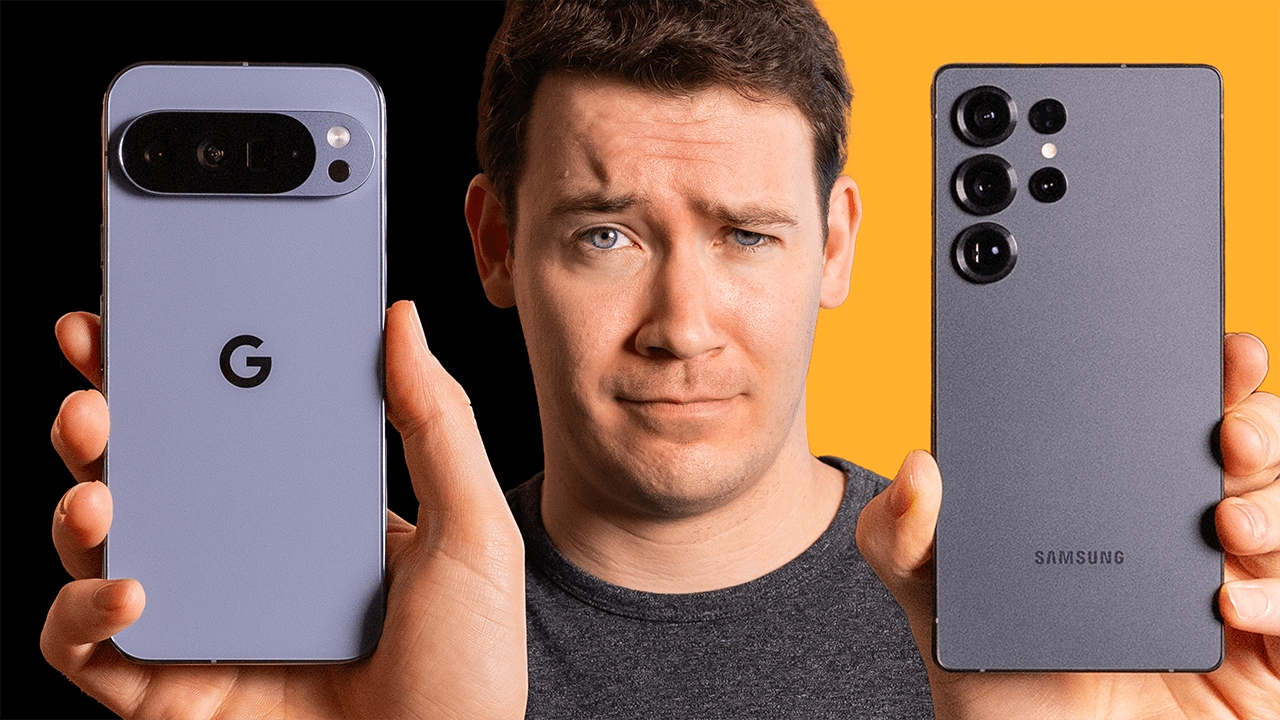
Performance-wise, I haven’t run into any issues with day-to-day tasks that I’ve done on this phone. However, depending on what you want to do with the phone, like graphics-intensive gaming, the chip performance of Tensor G4 is less than other flagship phones, as I’ve demonstrated in our Pixel 9 Pro XL versus S25 Ultra video.
Another downside I’ve had with the phone is overall, as I’ve owned it and the months have gone on, I’ve actually found myself opening the inner screen less and less over time for tasks like reading. Even though, yes, the larger display is preferable over the outer screen, I don’t find it as comfortable to read on as other devices like my Kindles or my Daylight DC1 that I’m reviewing, which has no PWM flickering.
Final Verdict and Recommendations
The last downside of this phone is, of course, price, which leads me to whether or not I’d recommend getting a Pixel 9 Pro Fold. This phone retails for $1,799. And that’s about $700 more than my Pixel 9 Pro XL. With that extra money, you could buy a pretty great standalone tablet or several Kindles or a Remarkable writing tablet. With that money, I think this phone is really for those who: one, have money to spend or get a good carrier deal, and two, want a phone experience that feels truly new. I think this phone delivers on that.
Now, if this was the only phone I plan to use for a year or a few years, six months later, would I have been happy with my choice or regretted it? For me, I would have regretted it. I don’t use the inner screen as often as I thought I would, I noticed the crease in more situations, which is still annoying, and I would have definitely been jealous of the people who owned the 9 Pro XL because of its better camera system. But that’s just me, and you may care about a completely different set of priorities and features that line up better with what the Fold offers.
So do I overall recommend this phone? Yes. As a foldable, I think it accomplishes what Google set out to do. The real question you have to ask yourself is: is the price difference enough to justify going for the Fold, and can you afford to get a replacement if this phone were to break? If you answered yes to both of those questions, then I think you’re good to get the Fold. And you can check its current price via our blog post link in the description and in the pinned comment. And there you’ll also find additional links to other retailers for easy comparison shopping.
But if you couldn’t afford to replace this phone if it breaks, or you can’t justify that price difference, then I think you should look at the Pixel 9 Pro or Pro XL, which I’ve done reviews on, which you can get to by clicking here. And for more of my Google device reviews, like my review of the Pixel Tablet and upcoming reviews of the Pixel Watch 3 and Pixel Buds Pro 2, you’ll be able to see all of that by clicking here. For 6 Months Later, I’m Josh Teder. Thanks for watching.