by Josh Teder
Whether you’re just getting started with Smart Home Tech or you’re looking to expand your current setup, I’ll cover everything you need to know about smart home platforms, protocols, and I’ll cover some cool devices to consider adding to your smart home in 2025.
Smart Home Platforms Overview
So in 2025, what smart home platforms are there to choose from? Well, based on my own experience and what I’ve seen in other people’s setups, here are the main ones I’d consider. First is Home Assistant. I’d put that right at the top of the list, and that’s because depending on how involved you want to be in your smart home and how much you actually want to automate, sooner or later you’re going to run into a limitation with some other smart home platform, and doing something with Home Assistant will likely fix that limitation you encountered.
Home Assistant is an open-source-based smart home platform, meaning it’s not controlled by one company. You’ll need to have a small mini server to run Home Assistant in your home. The one I use is called Home Assistant Green. It’s $99 and was simple to set up and is simple to maintain. I’ll leave a link to my review of it as well as purchase links to everything I cover in this video in our blog post at 6monthsl.net, and for updates throughout the year on Smart Home stuff, make sure you check out our homepage. I’ll post stuff in our home feed related to Smart Home Products and news.
Home Assistant has several advantages: it’s often updated to the latest Matter standard, integrates with practically everything, and it’s not going anywhere. The only downside is, depending on how technical you consider yourself to be, there might be a steeper learning curve at first since it can do a lot more things than the other smart home platforms.
If you’re primarily in an Apple household, Apple Home should be your main UI for controlling your smart home. You can always use Home Assistant to actually connect and run everything and then expose all of your smart home devices from Home Assistant to Apple if your setup is more complicated. That’s a popular strategy I see many people use, but again, depending on how technical you are, it might just be better to use Apple Home for everything. Apple makes it very easy to set up devices. Stuff works locally because Apple requires a home hub to reliably control all of these devices. An Apple TV 4K, second-gen HomePod, or HomePod Mini – all of those will work as a home hub, which is important because ideally you want everything in your home controlled locally.
For those primarily in an Android or Windows household who aren’t super technical, Google Home is a good option, though in my home at least, the Google Assistant is the slowest to respond via my Nest Hubs compared to Apple’s assistant on HomePods and Amazon’s on my Echo devices and Sonos speakers. My guess is some commands for Google are still processed in the cloud for some devices.
Amazon’s platform is one of the simplest to use for setting up and managing smart home devices. This is in part because of their simple setup: you plug in devices that work with the Amazon Assistant, ask the Assistant to discover devices (or sometimes it’ll just discover them automatically), and follow the on-screen steps to set them up. It’s really simple, but if you’re an Apple household, I’d still stick with Apple Home unless you already have a bunch of Amazon devices.
If you’re a big Samsung fan or you’re involved in the Samsung ecosystem, Samsung SmartThings would likely be a good starting point again if you’re not super technical. Otherwise, you’d still probably want to go with something like Home Assistant.
Now let’s talk about Homey. LG recently acquired this brand, which makes a really nice smart home hub with a slickly designed app and automation experience. The only downside with Homey is, because it’s not open-sourced and it’s produced by a single company, there’s just not as much stuff made for it, and there’s not as big of a community behind it. Homey, like Home Assistant, relies on a local hub. It’s secure, and your stuff will just keep running as long as you have power unless some of your devices still rely on the cloud for certain features.
Do I recommend getting a Homey Pro over Home Assistant Green? No. Even considering Homey has a new product called Homey Pro Mini which retails for $200, about half the price of the Homey Pro, I’m still not sure I’d recommend it over the Home Assistant Green with a Sky Connect, which is still $50 cheaper.
Understanding Smart Home Protocols
So those are all of the various smart home platforms you can go with, but before you start buying a bunch of new smart home devices, I still think it’s important, even in 2025, to have a basic understanding of exactly how all of this stuff works. To do that, you need to know what the common protocols used by smart home devices are. The main ones are Wi-Fi, Thread, Zigbee, and Z-Wave.
Now, protocols are simply a set of rules that dictate how devices communicate with one another, and they often have specific hardware requirements. So Zigbee smart home devices, like a Philips Hue bulb for example, need to have a radio built into them that allows them to communicate over the Zigbee network. Same thing for Thread, Wi-Fi – you get the idea.
Why do you still need to know about the protocols? Well, two reasons. First, you still need to know exactly how these devices will actually connect to the internet. For your Thread door lock to work and hook into the internet, you’ll likely need a device that acts as a Thread border router. Now, Zigbee and Z-Wave devices often need dedicated hubs hooked into your router. That’s what Philips Hue lights use with the Philips Hue Bridge, and if you have multiple devices using Zigbee, oftentimes you can actually just have them all use the same hub. That’s the second part of why knowing the protocols is helpful – it can actually help you simplify your setup a bit.
Now, what happens when you buy smart lights that are all Zigbee-based, but your door lock is Thread-based, and your thermostat only has Wi-Fi built into it? How can you make sure all of these devices can connect to the same thing? Previously, you’d have to buy products that were certified to work with your smart home platform of choice, but this actually limited what types of devices you could buy, especially if you used Apple’s HomeKit. The Nest Learning Thermostat, for example, was and still is one of the most popular smart thermostats, but for years, if you bought one and you didn’t want to use the Google Home app or Google Assistant to control it, it was a pain to try to get it connected into Apple Home or Home Assistant.
This is where the new Matter smart home standard comes in. For the new Nest Thermostat, when I went to add it to my Apple Home, I just used Matter. I scanned a QR code, told Apple what room it was in, and boom – I could control my thermostat with Apple’s Assistant and see it in the Apple Home app. Now, the fourth-gen Nest Thermostat isn’t specifically certified to run with Home Assistant, but by using Matter, I could easily get a pairing code from the device in Apple Home using Matter’s new device credential sharing feature, paste it into Home Assistant, and boom – there was my thermostat added into Home Assistant.
And speaking of Home Assistant, let me take a quick moment to talk about where I get a lot of my smart home gear from: AeroDroid. I’ve been using the Home Assistant Green, Sonoff smart plugs, and various sensors I bought for my smart home from their site for the past year. They’re not just sellers; they’re genuine tech enthusiasts. They’ve been serving the market since 2014, and what I love about them is they actually use what they sell, which makes a huge difference when you need advice on your next project.
Their team is incredibly helpful whether you’re just starting with smart home automations or scaling up for a commercial project. They’ll work with you to find the perfect solution, like they did with me, advising me on what to buy for Home Assistant’s new Voice Control Preview Edition device. I didn’t even realize I could offload the natural language processing to a separate mini computer so everything runs locally. Plus, I appreciate their commitment to digital sovereignty, giving you the tools and knowledge to maintain control over your tech. So check out AeroDroid by using the link in the description below and get fast shipping on your first order.
Now, not everything supports Matter or works with it, but based on my experience with devices that do, it is most certainly a step in the right direction for the smart home.
Smart Device Recommendations
All right, so that’s a bit about the smart home protocols, the Matter standard, and platforms. Now let’s talk about the devices that you should get for your smart home and in the order which I’d personally buy them if I was just starting off from scratch.
First up is thermostats. They’re one of the easiest things to replace in your home and one of the easiest things to automate in your home. For 2025, there are two newer smart home thermostats I’d consider from Google and Ecobee. The new fourth-generation Nest Thermostat is a complete design overhaul from the previous version, with a larger display, slimmer profile, and encased in this beautiful glass front that perfectly hides the display’s edges. It also comes with temperature sensors you can place around your home for an aggregate whole-home temperature.
With a Nest Thermostat, it’s a bit different from traditional thermostats. You can set your comfort temps, but you don’t actually set up a weekly schedule. By default, based on a variety of factors like weather, humidity, time of day, and the year, the thermostat will learn what temperature you like based on your manual adjustments and all of those other data points. That’s why it’s called a Learning Thermostat.
Ecobee has an upgraded thermostat, the Premium Smart Programmable Thermostat, which has a larger screen, more premium materials, support for Apple’s and Amazon’s Assistant on device, Apple’s HomeKit support, and support for the Google Assistant. However, at the time of recording, Ecobee has not announced when their thermostats will support Matter, which makes the Nest Thermostat my number one recommendation in this category.
Smart Security Solutions
Next up, let’s talk about smart locks. Now, they’ve become one of my favorite smart home device categories because they solve a few problems with traditional locks. These devices allow you to enter your home using other things besides a key – typically your phone, watch, a keypad, fingerprint sensor, and some even have facial recognition. They also allow you to easily share one-time guest codes to get into your home, and my personal favorite, they help confirm whether you remember to lock your door after you’re already on your way to the airport.
Smart locks, like a lot of other Smart Home Tech though, have been a bit uneven with their user experiences, especially if you have a household with a mix of Android and iPhones. Some smart locks support Apple Home Key, allowing you to just unlock your door by tapping your iPhone or Apple Watch, which is pretty cool. However, if you have an Android phone, you’re out of luck because Android has no similar feature.
Now, this is where things get interesting because there is one more standard you should know about called Aero. Aero builds on the success of Home Key, which uses NFC, the same technology that powers Apple Pay. Smart locks that support this standard can be unlocked by tapping them with an NFC-enabled iPhone as well as an Android phone. However, there’s another new important technology coming to the world of smart locks this year that’s really important, and that’s Ultra-Wideband.
If you’ve ever used an AirTag, Ultra-Wideband is the technology that enables that precision finding field feature. Now, Ultra-Wideband seems like it’s going to be an optional part of the Aero spec, unlike NFC which will be required. However, smart locks that support Ultra-Wideband have already been announced, such as the new Schlage Sense Pro due out sometime later this year and the UltraLock Bolt Mission.
What Ultra-Wideband in a Smart Lock does is allow for a more accurate auto-unlocking experience, so your door will be able to automatically unlock as you approach it because the lock now knows exactly how many feet away from it you are, how fast you’re approaching it, and that you’re approaching it in the direction from coming from the outside. Previous smart locks like my fourth-gen August lock have relied on other tech like Bluetooth to enable auto-unlocking. However, this has never really seemed to work that accurately – sometimes it would unlock too early and then lock itself by the time you got to it, or it unlocked too late, making you wait at the door.
So this year, here are the door locks I’d seriously consider getting. First are the Schlage Sense Pro and UltraLock Bolt Mission. Both locks have Matter over Thread, Apple Home Key, and tap to unlock, a physical keypad and key wave for the UltraLock, and a touchscreen keypad for the Schlage. If you don’t care about the new Aero standard and just want a lock with Home Key that’s on the market today, Schlage has a pretty good one called the Encode Plus Smart Wi-Fi Deadbolt.
Level and Yale are two other brands I’d seriously consider. And for renters, you’ll want to look at August or another brand like Level that allows you to keep the same key on the outside. If you go for August though, make sure you pick up a bridge for it – it’ll significantly extend the battery life of your deadbolt from like 1 to 3 months to 4 to 6. Also, I’ll leave a link to my review of that lock in the blog post for this video at 6monthslater.net. The post will also include all of the locks I recommended in this category and links to learn more.
Smart Lighting and Motion Control
Now let’s move on to Smart Lighting, which has been one of the most popular entry points into Smart Home Tech. From a standards perspective, not much has changed in this category except Matter finally being more common now. This will make it easier to buy smart lights from different manufacturers, connect them all to your smart home platform, and then automate basic lighting from there.
Now the players to look out for in this space are Philips Hue, LIFX, Govee, Nanoleaf, Lutron, and GE Sync. I’ve personally been using Philips Hue in my apartment for over 10 years now, and while yes, they’re typically more expensive than competitors, they’ve also at the same time just worked flawlessly for me.
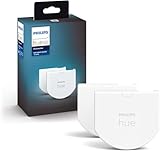
If you decide to go with Philips Hue or another similar brand, two additional products they make might be of interest. Many new constructions use these LED flat discs for recessed lighting. Phillips makes multicolored replacement ones you can install, but no White Ambiance ones yet as of this recording. They also have an important accessory you can attach to any light switch that’ll prevent people from turning off your smart lights and make the switches you already have in your walls work with your smart lights.
One related aspect to Smart Lights that you should definitely try is motion sensors. I’ve tried two different kinds over the past several years. The first is just your standard passive infrared motion sensor, which you can set to turn your lights on when you walk by. I have these in every room of my home. Not only can you set them up to turn on the lights, you can have logic in your automations that will turn off the lights after a set time and other logic to set what lighting scene should turn on depending on the time of day.
The second type of motion sensor to play around with is the millimeter wave sensor. These can detect presence in a room even when people are stationary, and they keep the lights on for as long as that room is occupied. Once somebody leaves the room, then you can have them set to turn off the lights after a certain interval.
Smart Window Treatments
Now let’s talk about automating your blinds, shades, and curtains. Many companies offer smart shades including Lutron, IKEA, Smarter Home, and more. Now, Lutron is typically considered one of the best. I’ve had their wood blinds sent to me for my office, and I’ve had them now for several years, and they have been solid. Mine are battery operated, and I’ve only had to replace them once, maybe twice in about 4 or 5 years, which is pretty great.
Home Security Systems
Next, let’s talk security systems. Now when it comes to security systems, there’s one important question you need to ask yourself: how much do you want to be able to integrate the sensors and devices that comprise your security system with your other smart home devices? So when your door sensor from your security system registers that the door is open, you can set your LIFX bulbs to automatically turn on.
Knowing the answer to that question will help you figure out whether to go with a company that’ll just come out and install everything and monitor it (which will be more expensive) or if you go the DIY route with professionally monitored systems like SimpliSafe or Ring, or if you’re really a tech enthusiast, it is possible to just build your own security system in something like Home Assistant without professional monitoring.
Though Abode and Ring Alarm are two DIY systems that also offer professional monitoring that seem to integrate well within Home Assistant. Abode in particular seems to integrate with all of the major smart home platforms and it runs locally via the HomeKit integration, which is interesting and probably the company I’ll go with when I move later this year. SimpliSafe, on the other hand, doesn’t have an Apple Home integration or any plans to join Matter or HomeKit, so I’m not sure I’d recommend that route for those who want it integrated.
Entertainment Systems
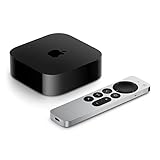
For TVs, my advice is pretty straightforward: don’t look at what TV will integrate with your system, but what streaming box will. Depending on who made the TV, the streaming devices are typically easier to integrate into your smart home than the TV itself. Options like the Apple TV 4K, Google TV streamer, Fire TV, and Roku can all be integrated into your smart home. At the time of recording, Roku doesn’t have Matter support, but the Apple TV 4K, Google TV streamer, and Fire TV all have some integration with Matter, where the TV streamer and Apple TV 4K with Ethernet both have Thread built in as well.
I personally use the Apple TV for most of my automations. It can automatically turn my living room lights off when the TV turns on and then turn them back on again when I turn the TV off, and it runs everything locally. I’ll leave a link to my review of the latest Apple TV 4K in our blog post, and if you want to see my upcoming review of the Google TV streamer, make sure you’re subscribed to the channel.
Smart Appliances and Accessories
Next, let’s discuss smart home appliances, and I think you need to be a bit careful here. A lot of them now come with smart functionality, like washing machines, ovens, range hoods, but every time I see one of these new smart appliances, all I can think about is the added complexity, which increases price and adds new points of failure. And the question you really have to ask is how much are you really getting in functionality-wise in return for that added complexity and price?
Now maybe a Smart Oven and stovetop that’ll automatically turn off when nobody’s home – yeah, I could see a use case for that, but it’s also a use case that you could just accomplish with a smart plug. Speaking of which, those are one of the most useful smart home accessories out there, especially for holiday decorations. TP-Link, Amazon, and others all make smart plugs – just don’t overpay for them. They should only cost around $10 US, and my current favorite ones are my Sonoff Zigbee ones because they were incredibly easy to set up with Home Assistant and are pretty inexpensive.
Conclusion
So those are my thoughts on the platforms and products I’d consider in 2025. Is the Matter standard useful now and getting better? Yes, we’re actually closer than we’ve ever been to most major Smart Home Tech all just kind of working together, but there is still more to be done. And is it even realistic to just expect everything to work in one app? Well, unless that app is Home Assistant, in 2025, probably not, but that’s okay really. I use multiple platforms, and it’s been generally fine.
The promise of having an automated home that you set up yourself is more achievable today than it has ever been. Devices are getting more efficient with better capabilities, but yes, you still have to put in a bit of work to set up, design, and maintain everything. But in my experience, once you have things set up the way you like, you can set and forget a lot of it. All the stuff you originally set up just kind of fades into the background, and your smart home just kind of works exactly the way it should be.
And I know I went through a ton of products and information in this video, so to make things easy, you can see all of the products I talked about with live prices, multiple retailer links for comparison shopping, plus links to a bunch of resources and sources I use to create this video and related videos on smart home devices. All of that is in the blog post for this video at 6monthslater.net.
Special thanks to our producer patrons who support the content we make, and if you’d like to support us and see your name appear in our credits, you can do that by using the link in our description. For 6 Months Later, I’m Josh Teder. Thanks for watching.